L lacit1707 Member Jul 17, 2015 9 0 0 Jul 20, 2015 #1 I have a picture saved to my desktop on computer. How do i post it?
N Neo_ii_Droid Well-known member Apr 7, 2015 640 0 0 Jul 20, 2015 #2 See that paperclip at the top right next to the paper plane? Use that to attach. Hope it works for you and enjoy! Posted via the Android Central App Attachments Screenshot_2015-07-20-07-32-22.jpg 16.7 KB · Views: 10 Upvote 0 Downvote
See that paperclip at the top right next to the paper plane? Use that to attach. Hope it works for you and enjoy! Posted via the Android Central App
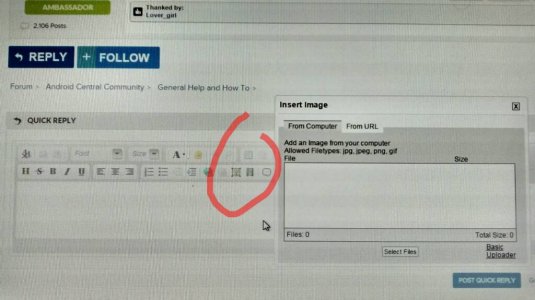
A anon(9555426) Member Jul 20, 2015 11 0 0 Jul 20, 2015 #3 If your on your desktop its the little picture icon you select. Then you can choose to browse files and upload. Upvote 0 Downvote
If your on your desktop its the little picture icon you select. Then you can choose to browse files and upload.
Javier P Ambassador Feb 21, 2014 19,478 6 0 Jul 20, 2015 #4 Try this. Sign in www.forums.androidcentral.com find the specific thread and tap on "Reply" at the bottom. Click on the picture icon with the tree, select "from computer" and tap on "select files". Attachments 1437416340262.jpg 69.7 KB · Views: 5 Upvote 0 Downvote
Try this. Sign in www.forums.androidcentral.com find the specific thread and tap on "Reply" at the bottom. Click on the picture icon with the tree, select "from computer" and tap on "select files".