how to remove favorites tray on Android 10 home screen

  • Thread starter Thread starter Android Central Question
  • Start date Start date
A

Android Central Question

Installed Android 10 on Pixel 2 today. Want to disable or remove unwanted favorites tray on home screen
 
Long press to delete doesn't work. Instead of being able to drag the app icon in the tray to "Remove", the options are "Cancel", which does nothing, or "Uninstall", which uninstalls the whole app.
 
Welcome to Android Central! You can't get rid of that on the homescreen of the Pixel Launcher. You'd have to install a 3rd party launcher like Nova.
 
What if I don't necessarily want to get rid of the whole favorites tray, just customize the apps in it. Or will it simply auto update every next time an app starts getting more use?
 
I believe it's automatically decided by the system. The idea is to predict which apps you want to use, based on your usage patterns and time of day. As time goes on, it's supposed to learn.

See further discussion below.
 
Last edited:
If the favorites tray is solely populated by learning, then why does it tell me that there is no more room in the tray when I try to move an icon in. Seems like it would just say that you're attempting an illegal action.

Besides, I know for sure that I moved an icon into the tray when it was not already full.

Moving an icon from the tray to the Google folder just results in copying it to the Google folder and leaving the icon in the tray.

As someone else already commented, moving an icon from the favorites tray to the top of the screen presents two choices : xUninstall and xCancel.

If you are not allowed to manually add or delete icons from the favorites tray, then why sort of allow it by allowing operations that are useless (uninstall and copy)?

I think it's a simple bug. If not, it's a useless feature for me and I would like to get rid of it.

Pixel 3a, Android 10.
 
Welcome to Android Central! You know, I'm not sure how I got sidetracked in my previous response above. The OP was originally asking about the Favorites Tray on the homescreen, but then I somehow started to think he was talking about the Frequent Apps that show up on the Overview (or in the App Drawer). So to clarify:

1. The Pixel Launcher's Favorites Tray (the lowest row on the homescreen) cannot be removed, but you can customize the app shortcuts that reside there. You can even make a folder of icons in the Favorites Tray. If you don't want a Favorites Tray, then you need to install a 3rd party launcher like Nova.

2. The Frequent Apps that show up along the bottom of the Overview page and in the App Drawer are not customizable -- those are the ones that the system chooses to show based on your usage.

Long-pressing an icon in the Favorites Tray and dragging it should give you the Remove option at the top of the screen, not the Uninstall option.
 
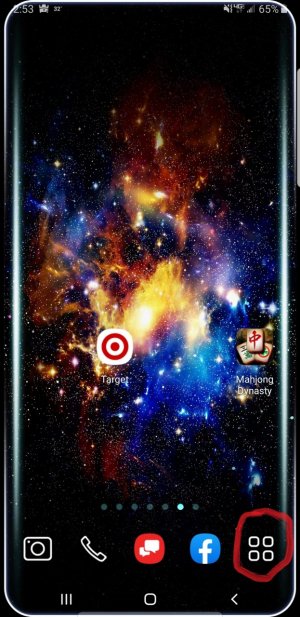
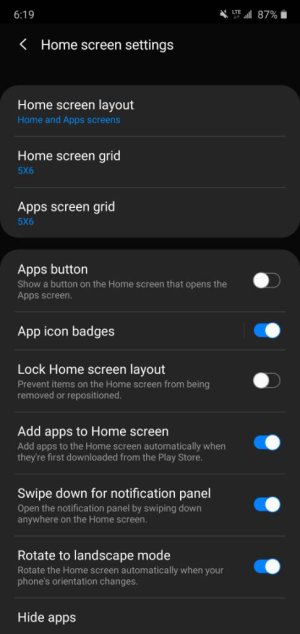
I have no trouble removing apps from the favorites, but I'm curious if there's a way to remove the installed apps icon? 4 little squares 2x2. Holding on the icon does nothing
 

Trending Posts

Forum statistics

Threads
960,066
Messages
6,981,004
Members
3,164,373
Latest member
luigui443