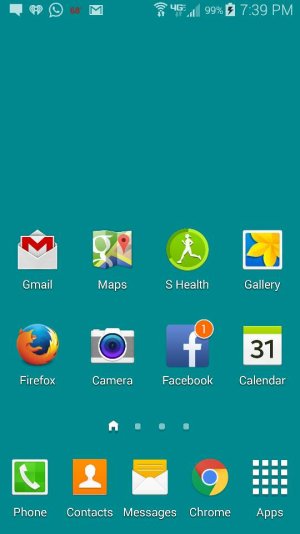
How to Remove the Sliding Bar from Homescreen

KFT512

New member
Oct 14, 2014
2
0
0
Help! I don't remember which buttons I pushed, but the sliding bar/tab to scroll to different windows showed up (see pic). Any idea how to remove this?

Posted via the Android Central App
 

Attachments

  • Screenshot_2014-10-13-19-39-47.jpg
    Screenshot_2014-10-13-19-39-47.jpg
    39.5 KB · Views: 56
I don't think u can , without a launcher but If you hold it down you can scroll between home pages faster..

Posted via the Android Central App
 
Why on earth would you want to? Think of multiple home screens like multiple desktops on your computer. It can be very useful. What is on your other screens?
 
Of course I use the multiple screens! But before (I've had this brand new phone for 2 months new), I can scroll just by swiping my finger across the screen and the one with that little house icon and the little dots weren't there till I accidentally pressed some buttons yesterday. The app icons are HUGE as it is and want to keep them on the lower half of the. screen

Posted via the Android Central App
 
No, you just did not notice them until now. As far as I'm aware, that is not something that is changeable/modifiable.
 
That should have always been there. At least on mine it always has. *shrug*

Posted via Android Central App
 
Touchwiz - no you can't remove it. I'm not sure if it shows up if you only have one screen though. I think it is absent in that case, but that is it.
 
Long press an empty spot, then u can add or remove pages on your home screen. See if you can find what u pressed the first time

Posted via Android Central App