Is it my battery or an app? - Note 4

zajajo91

Member
Dec 20, 2017
22
0
0
Hello, I've recently had my motherboard replaced under warranty due to hardware failure. Now I've gotten my phone back, the battery life is quite bad. I was in the gym for 2 hours yesterday and went from 100% to 80% and I only used it for about 2-3 minutes.

Is there a way to find out if it's an app rather than the battery? I've bought 2 batteries in the past and it ended up not being the battery.

Thanks.
 
A new motherboard means new system apps and new firmware, which means tons of updates. That could be causing it. Give it a week.
 
Battery Draining way too fast - Note 4

I was wondering if anyone could help. My batter drain is way too fast, the phone would probably last 3-4 hours under moderate use, and gets quite warm. It previously had a motherboard failure, so I've had a new one replaced under warranty, and on top of that, I've bought a new Samsung Note 4 battery, and it's only been used for 3 days now. Not sure why the battery life is so bad. At one point in the battery settings it said Google Photos used 17%, but I haven't been using it since then. Even if I force stop, the battery still goes down quite fast in general.
 
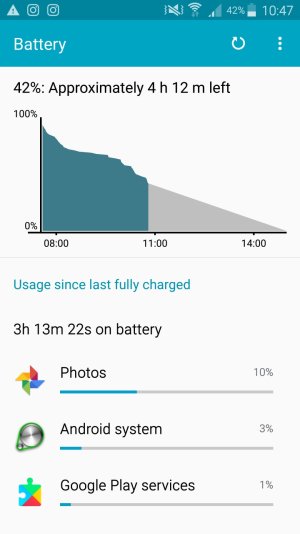
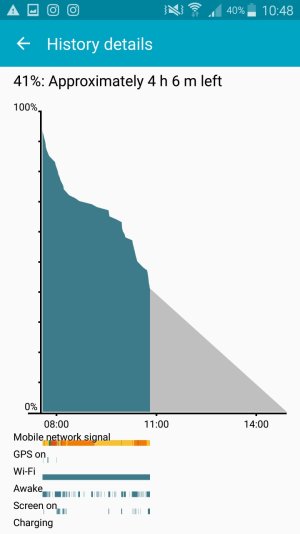
Show us some battery stats. Charge up to 100%, then let it drain to 20-30% with normal usage, without charging in between. Then show us:

1. The main Settings>Battery screen.
2. The fullscreen battery graph screen (which shows Awake time and Cell Signal Strength).
3. The Screen category (to see total Screen On time).
4. The Cell Standby category, if present (to see Time Without Signal).


You might have to install a 3rd party battery monitor, like GSam Battery Monitor, to get the Cell Signal Strength graph.
 
Hello. Sorry for the slow reply. Does this help?

I know the phone is almost full, 1 gb left on 32gb phone and 4gb on 64gb media card, but it shouldn't lag and restart itself either.
 

Attachments

  • Screenshot_2018-04-25-10-47-54.jpg
    Screenshot_2018-04-25-10-47-54.jpg
    102.4 KB · Views: 10
  • Screenshot_2018-04-25-10-48-44.jpg
    Screenshot_2018-04-25-10-48-44.jpg
    81.5 KB · Views: 8
It could be mediocre cell signal. There's a lot of yellow where the battery curve is steepest, and you only have a couple of bars in the status bar indicator. GSam Battery Monitor can give you a better cell signal strength graph.

Also, Photos is using quite a bit of battery. If you haven't been actively using it, it might be trying to back up photos and videos in the background. If it's doing so over mobile data, and the signal is poor, that means uploads will take a longer time, which will use more battery.
 
For some reason it fails to backup lately, it just says "Getting Photos Ready...", I've set it to only backup under WiFi though. Maybe it's trying to backup automatically even when I don't open it. Not sure what to do. I turn my phone on and within 10 minutes it'll be on 89%.
 
Try going to Settings>Apps​, select Google Photos, and Clear Cache/Clear Data. Then open the app again, give it a little while for it to sync with your Google Photos in the cloud, and see if the backup works normally now.