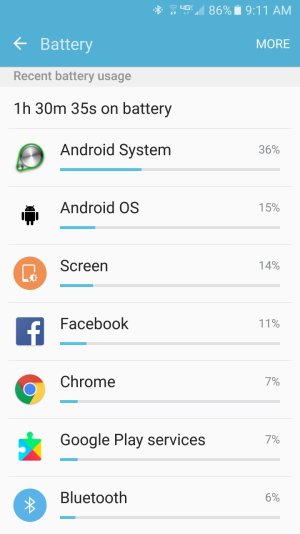
Is this normal battery life for my Verizon Galaxy s7?

Seth Mishne

Well-known member
Dec 19, 2012
57
0
0
Screenshot_20160731-091124.jpg
I cannot figure out what would be making my battery drain so quickly. Any tips on getting my phone to last most of the day. My battery life seems a little bit better than my s5 which also had battery problems but not much better. Would someone please be able to help me figure out what is making my battery drain really quickly thanks.
 
Battery life is pretty bad during the first 4 days as the phone is still figuring out what apps to apply power saving on. It waits 3 days before it starts power saving.

Also if it's a new phone you'll have a lot of data syncing in the background for the first few days as well. Wait 5 days, then if it doesn't improve, try a system cache wipe.
 
No I got it in late may. I expect to make it close to dinner time before I need to charge. I don't want to depend on a charger to make it through the day.
 
Do you move around with your phone? Getting a phone signal when you move around can eat battery. Android System at 36% might be doing that.

Posted via the Android Central App via a kicking Gold Galaxy S7 Edge.
 
Looks like you have 4G, it the screen shot from your house?
Did you get all your apps at the Play Store?
Did you switch your network from Global to CDMA/LTE or the GSM network?
Your WiFi looks week from the screen shot.
 
This picture is from my house. Most of my apps are from the play store but a few are from amazon. I did not it is on the default settings.
 
No but service is not the best at my house.

That's could well be it. When at work my phone battery is killed by the fact that there is no signal in there.

Posted via the Android Central App on a kicking Gold Samsung Galaxy S7
 
Before I blame the signal, I'd suggest a cache wipe first. There's nothing you can do about a bad signal other than possibly buy a repeater.

Turn off the phone, then power it on while simultaneously pressing the home and volume up keys. Keep on pressing those keys until you see a blue screen with an android picture (you can let go of the power button as soon as you see the Samsung logo). Then use the volume keys to scroll to wipe cache. Take care not to select wipe phone memory as the options are next to each other. Wiping cache will not delete your files. Use the power button to confirm selection. When done, select reboot phone.

Also check for any updates you might have.