Just got a Galaxy Note Edge this week, learning things but edge notifications.

Brick ONeil

Member
Jun 5, 2015
20
0
0
I've researched on how to successfully limit battery usage, block background data, use power saving mode, dim screen brightness among other ideas. What really garnered my attention to the Note Edge was using the edge screen for call/email/messaging/social media notifications but none are working. The cnn and flipboard edge screens do work but error out, requiring deleting and re-adding. Another user posted their edge screen setting options and my Note Edge doesn't have half of them. I'm still using kitkat 4.44 and won't update the OS until/unless 5.11 is steady.

How do I enable the edge screen notifications that were advertised?
 
Doesn't look like anyone else knows how to enable edge side screen app notifications either, lol. Well, thought i'd try here first.
 
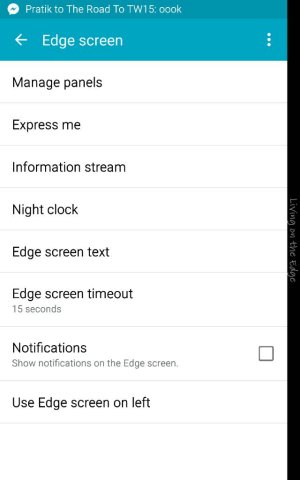
Settings>Edge Screen.... Check the box next to Notifications Then you have to enable them from within whichever application you want notifications on the Edge screen from. For example, in the phone app, it's kind of hidden. In the settings, select Call, then Call-related popups.
 
Thank you for responding, I did find the call popup notifications. I was looking for the edge notifications that were shown on the marketing campaigns, where the app icons on the edge screen panels have the number of posts/replies/items on each individual icon, such as, 4 facebook notifications, 3 twitter, 5 text messages, 3 emails and so forth. I'm not finding those instructions. The notifications come in generically on the time panel only.
 
I do get edge notifications for Facebook, Messages app, and linked in like you described. I'm not recalling where the settings are buried though.

Posted via the Android Central App
 
Edge screen notifications should be on by default. You can't disable them unless you've upgraded to Lollipop. uploadfromtaptalk1433893701524.jpg

Sent from my Samsung GALAXY Note Edge on AT&T
 
I've researched on how to successfully limit battery usage, block background data, use power saving mode, dim screen brightness among other ideas. What really garnered my attention to the Note Edge was using the edge screen for call/email/messaging/social media notifications but none are working. The cnn and flipboard edge screens do work but error out, requiring deleting and re-adding. Another user posted their edge screen setting options and my Note Edge doesn't have half of them. I'm still using kitkat 4.44 and won't update the OS until/unless 5.11 is steady.

How do I enable the edge screen notifications that were advertised?

1st and foremost, DO NOT UPDATE unless you are forced to. The pop up notifications on lollipop appear over the top of the edge screen notifications, rendering the edge screen notifications useless.

About your issue, I'm not sure I can help you. I don't recall what the layout of the menu system used to be (if it is different now) and all my notifications were on by default. The stock edge screen has contacts, phone, email, messages etc etc. The number of notifications for those apps does appear over them.
 

Trending Posts

Members online

Forum statistics

Threads
960,323
Messages
6,981,961
Members
3,164,478
Latest member
Doris King