Question BT Keyboard Function Help - Enable Special Keys

mccmw

Active member
Nov 30, 2024
27
5
3
Please feel free to move this to appropriate forum...I didn't see one that "fit." I have an Android streaming box and paired a BT keyboard with it. The keyboard worked fine with its predecessor, including special keys like Home, Back/Return, etc. The keyboard, touchpad, and left/right click buttons work, but the special ones don't. Is there an app I can download that will reenable these for the new box? I wasn't sure if something like Gboard or Swiftkey would enable the functions, or I need something else. Right now, the keyboard in Settings is labeled as AOSP Android keyboard. Any recommendations would be appreciated. Thanks.
 
What brand and model is the keyboard?

Please attach a picture of the keyboard to this thread.

What so the special keys you want to use do? Or are you just talking about the Home and navigation buttons?

What brand and model Android streaming box are you using? What brand and model was the previous unit?

It sounds like you've had this keyboard for a while so we'll assume you understand how it works and that you're familiar with its operation. Is there a factory reset button for the keyboard? Most BT devices like this are plug and play and don't require an app to work but some have companion apps that enhance their features and might allow users to do things like key swap or activate special functions. Have you searched the app store on your device for any apps related to your brand of keyboard? Swiftkey and Gboard are stand alone apps that are keyboards and wouldn't help in this case.

Based on the information provided, it sounds like you may have turned something off on the keyboard but I don't know enough about your keyboard to really guess at that. I am the person who often struggles with that fn key. The key actually says fn and has yellow type face for the keys it gives extra functions to. This also brings up an issue someone posted not long ago about their keyboard changing "layouts" and moving or taking away keys. I'll try to find that thread and post it here if I can. But it could be that you hit 2 or 3 keys and changed the keyboard setting. It could also be that this brand of streaming box doesn't support these functions on the keyboard.

Let us know what you find and the answers to the questions and we'll offer more advice.
 
My apologies for delayed response. The keyboard is a

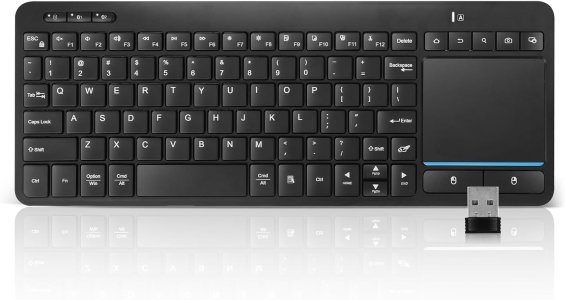
BNNWA Multi-Device Wireless Bluetooth Keyboard with Touchpad-Wireless Keyboard with Multi-Touch Big Size Trackpad,Support 3 Devices for PC,Windows, Android, Chrome OS, Laptop, Tablet .

I attached a picture. The main keys I'm trying to get working are the special keys in the top right. Likewise, I wouldn't mind figuring out how to get the directional keys to also do "page up/down."

The previous device was a HiMedia Q10 Pro Android streaming box. The new device is a Zidoo Z9X 8K.
 

Attachments

  • 61LnLLdXd6L._AC_SL1500_.jpg
    61LnLLdXd6L._AC_SL1500_.jpg
    83 KB · Views: 4
Thank you for the information.

I looked up your box with "keyboard issues" and got a hit for their own forum pages. Knowing they have a forum, I would direct you there. There everyone will have a similar or the same box as you and some may have had this same issue. In this thread the OP is asking about the back button, different from your problem, but the thing that struck me was it sounds like the devs are chiming in with one saying they were looking into bugs with the unit. Here's a link to the site and that thread.
 
  • Like
Reactions: Laura Knotek