Lock Screen Widgets

chuckr01

Well-known member
Dec 28, 2011
212
1
0
My corporate account requires me to have a Pin or Password. To unlock I have to enter my Pin. I can't figure out how to use the Lock Screen Widgets, the add options don't appear. Is there a way to get around this?

Second question, can other widgets be added to the choices, any that I have loaded from the Play Store? I would like to replace the goofy looking default clock with 3D Weather Clock Widget.
 
do you run 4.2? it should be there.. I think eventually dev teams will add lock screen widgets.. but for now we get only email,messaging,clock and something else.
 
do you run 4.2? it should be there.. I think eventually dev teams will add lock screen widgets.. but for now we get only email,messaging,clock and something else.

Yes, I have 4.2, it came to me without looking for it, others I know have had to jump through loops to get it. I'm thinking there is a security lock preventing this which probably makes sense. Not a big issue, just curious. Can I set up a new user account with my same g-mail account and have a Home and Work user? I got part way there last night and had two accounts but wasn't sure if they would work right with the same g-mail. When I set up the duplicate g-mail I was able to see how this works but am not sure how that will function in the long run. If I could just change the one widget I would be happy. I don't want any of my other info open if I lose my tablet.
 
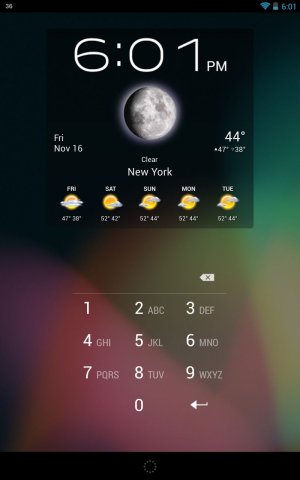
HOORAY!!! HD Widgets added support for lock screen!
 

Attachments

  • Screenshot_2012-11-16-18-01-51.jpg
    Screenshot_2012-11-16-18-01-51.jpg
    64 KB · Views: 35
Hi,

I am also interested in adding a weather/clock widget to the lock screen. Can you please tell me what widget I need to get from the google play so I can add it to the locked screen.

Tks.
 
Hi,

Thanks for the quick reply. I downloaded a widget now when I hit the + button, I still only see the default set of widgets, how can I add the weather/clock?
 
Yes I to am wondering this because I don't know how to do it on my GS III either.
 
Hi,

Thanks for the quick reply. I downloaded a widget now when I hit the + button, I still only see the default set of widgets, how can I add the weather/clock?

are you sure you downloaded HD widgets? because they should be there by default.... Try this go to HD widgets main app go to settings/Widget sizes see if Phone Lockscreen checked if not check it. Try again// restart might also help
