
So, I finally got JB on Monday morning. After playing with it a bit (and liking it very much) I've been trying to figure out Google Now. I followed the setup guide here: How to Set Up Google Now
I'm walking through the setup for Google Now according to that guide and I get to the location services section and for some reason MY GN P&A screen looks totally different than the sample GN P&A screen. Here is the sample:
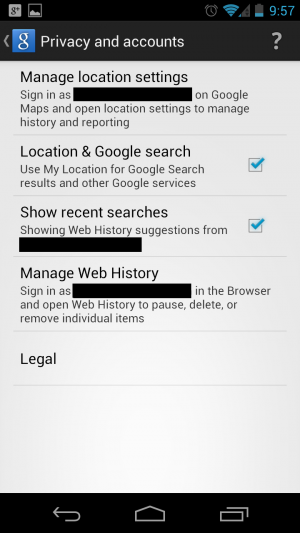
I don't know how to take a screenshot of my own phone, so I'll just describe my screen:
Top Bar: Privacy and Accounts. exactly as in the screenshot.
First section: Google Account: lists my gmail address.
Second Section: "Manage Location History" link
Third Section: "Location Services" link
Fourth Section: "Show Recent Searches" checkbox
Fifth Section: "Manage Web History" link
Sixth Section: "Legal" link
As you can see it differs greatly from the setup guide sample screen. Also, I don't have any of the settings for location that appear in the instructions under Location History when I open Maps. As such, the Location and Travel card doesn't seem to work at all, or at least, it never pops up.
Is this an issue of a Beta vs Final, has Sprint perhaps been messing with the available settings, or am I simply missing something really obvious here?
Secondarily, In order to fully utilize GN, do I need to simply keep it open all the time? I noticed the lack of a GN widget. I am in the habit of closing something as soon as I am done with it to save battery life. Should I not be doing this, or doesn't it matter with GN?
I really want to take advantage of all of GN's power, but it doesn't seem to want to let me.
Help!
I'm walking through the setup for Google Now according to that guide and I get to the location services section and for some reason MY GN P&A screen looks totally different than the sample GN P&A screen. Here is the sample:
I don't know how to take a screenshot of my own phone, so I'll just describe my screen:
Top Bar: Privacy and Accounts. exactly as in the screenshot.
First section: Google Account: lists my gmail address.
Second Section: "Manage Location History" link
Third Section: "Location Services" link
Fourth Section: "Show Recent Searches" checkbox
Fifth Section: "Manage Web History" link
Sixth Section: "Legal" link
As you can see it differs greatly from the setup guide sample screen. Also, I don't have any of the settings for location that appear in the instructions under Location History when I open Maps. As such, the Location and Travel card doesn't seem to work at all, or at least, it never pops up.
Is this an issue of a Beta vs Final, has Sprint perhaps been messing with the available settings, or am I simply missing something really obvious here?
Secondarily, In order to fully utilize GN, do I need to simply keep it open all the time? I noticed the lack of a GN widget. I am in the habit of closing something as soon as I am done with it to save battery life. Should I not be doing this, or doesn't it matter with GN?
I really want to take advantage of all of GN's power, but it doesn't seem to want to let me.
Help!



 Facebook
 Twitter
 Instagram