MMS now working on Solavei.

rjj1976

Member
Nov 2, 2012
13
0
0
I have tried changing my APN settings but have not been able to send a MMS. If you have it working could you post your settings. Thanks
 
Last edited:
Re: Does anyone have MMS working on Solavei.

I have tried changing my APN settings but have not been able to send a MMS. If you have it working could you post your settings. Thanks

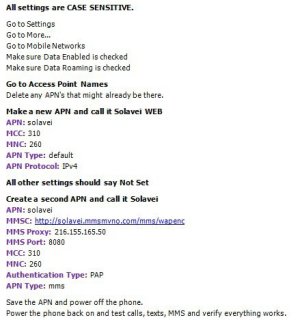
I finally got MMS working on the Nexus 4 on the Solevei unlimited plan. The attachment are the settings to make it work.

I have only been using it for a week now in Las Vegas and so far I am pleased.
 

Attachments

  • Solaveo MMS settings.jpg
    Solaveo MMS settings.jpg
    47 KB · Views: 336
Last edited by a moderator:
Re: Does anyone have MMS working on Solavei.

I finally got MMS working on the Nexus 4 on the Solevei unlimited plan. The attachment are the settings to make it work.

I have only been using it for a week now in Las Vegas and so far I am pleased.

Are these settings still working for everyone? I have a Nexus 4 and a Solavei setup kit on the way.
 
Re: Does anyone have MMS working on Solavei.

Thanks for that fix, I'll be getting mine this Monday probably and would be using Solavei.
 
I got everything setup and running yesterday but forgot to test MMS. Just tried several MMS sends and its not working. I double checked my settings with those shown above and everything is correct. Rebooted, tried again. Nothing. Any suggestions?
 
I got everything setup and running yesterday but forgot to test MMS. Just tried several MMS sends and its not working. I double checked my settings with those shown above and everything is correct. Rebooted, tried again. Nothing. Any suggestions?

Did you delete the APN that was on the card to start with? Mine didn't work until that APN was deleted and the phone rebooted.

Sent from my Nexus 4 using Tapatalk 2
 
Did you delete the APN that was on the card to start with? Mine didn't work until that APN was deleted and the phone rebooted.

Sent from my Nexus 4 using Tapatalk 2

Mine had a T-Mo APN listed and I deleted that. I now have just the Solavei WEB and Solavei MMS APNs.
 
What messenger are you using? Is your Nexus running 4.2.1?

Sent from my Nexus 4 using Tapatalk 2

Handscent. Yes, 4.2.1 and rooted.

Maybe I'll just delete the MMS APN, reboot, add it back, reboot, and try again. BRB...
 
With handcent also from the main page go 3 dots->more ->undelivered. Delete the ones that didn't send and start over. My experience with handcent has been that if it fails initially it takes a resend.

Sent from my Nexus 4 using Tapatalk 2
 
With handcent also from the main page go 3 dots->more ->undelivered. Delete the ones that didn't send and start over. My experience with handcent has been that if it fails initially it takes a resend.

Sent from my Nexus 4 using Tapatalk 2

Thanks for the tip. Recreated the APN as I mentioned and deleted the undelivered MMS. Retried with no change :(
 
Back to recheck basics. You've gone to settings -> more -> Mobile Networks, Data Enabled is checked. Also settings -> data usage, mobile data is on.

I also assume you're letting handcent resize the image... If that all looks good. Using something like ES File Explorer navigate to the handcent folder. There's a .txt file - make sure the MMS settings appear there correctly.

I would then uninstall handcent and try the stock messenger as a test.

Sent from my Nexus 4 using Tapatalk 2
 
All the settings are correct.

I looked for the text file but couldn't find it so I uninstalled Handcent and tried the native app. It worked. Reinstalled handcent and tried again - no go. Removed Handcent again and tested with native app - worked. So its a Handcent problem. I'll reinstall and clear app data and try again.
 
I'm glad it's working for you - sort of... What version of handcent are you using? I'm using 4.6.3. Occasionally, a picture hangs. But it usually works fine.

Sent from my Nexus 4 using Tapatalk 2
 
I'm using the latest - 4.6.3. :/ I've used it for years and never had a problem but just setup my N4 yesterday.
 
I think the one default I've changed is 3 dots->settings ->application settings -> default messaging application. I selected "All"

There are a lot of complaints about this version of handcent. I don't know what else to try.

Sent from my Nexus 4 using Tapatalk 2
 
I think the one default I've changed is 3 dots->settings ->application settings -> default messaging application. I selected "All"

Yeah, I tried that too :( Thanks for all the suggestions though. I guess I'll try a different one for a while, maybe check back after the next update :)
