MS Word Viewer that can handle equations?

sahmad88

Well-known member
May 1, 2010
88
0
0
The title says it all. I haven't tried the paid version of apps because I don't want to spend the money if it doesn't work. I am a math teacher. It would be great if I could create the equations, too, but I realize that is a dream. But I would love to be able to view my tests properly formatted or create problem sets for students with some handwritten notes or solutions that I can post online. I am the AP Calculus teacher at my school and i see a lot of potential.
 
I am also a math teacher. I just now opened an old test I had created in word and saved in my Google docs account and the equations are intact. :-)
 
I've been playing around with this a little more, and think the Polaris office app is the way to go. you can view formulas and other inserted images, and you can also draw in the document with the pen. I have some online students,and this is going to be a fantastic way to send handouts on the fly as well as grading papers. The Polaris app is preinstalled on the flyer.
 
Thanks, Suzi. Polaris does seem to work best. I am not sure why the other two can't seem to keep my placement of embedded objects like pictures and equations in the right spot. Unfortunately, Polaris doesn't seem to be able to handle all equations. My integrals and summations, for example, are all messed up. So i am still in search of the perfect app.
 
Have you tried copying equations from wolfram alpha?

Sent from my HTC Flyer P512 using Tapatalk

No, I haven't, but that wouldn't help for what I want to do. I want to view tests or worksheets that are already written, either by colleagues or myself. Also, I have my calculus students research and write their own papers at the end of the year. This weekend some of them have been sending me drafts to comment on. It would be great if I could use the tablet to comment directly on their papers.
 
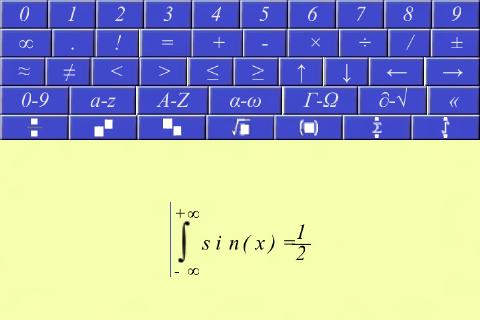
One solution might be to use an Android equation editor such as Equation Notepad for Android which you can save out the equation in Unicode or as an image. Then you can insert this into your word document as an image file which would be able to be displayed in any Word Viewer.

Here is a screenshot of the one I mentioned:

xrbCb4GzoDcqJRTCA3RZMp_j88uvRZUjI2lNWCO77LQ4E-faIPVO4qhJeMASjjYGSfI

What you do is just tap on the buttons to enter your equations. The bits where it says 0-9 and so on show you different menus. << is the delete button.

Hope that helps! ;)