
Did you know that is possible to view an app as a pop up window (as Tab pro) in version 4.4.2 (i haven't try it in version 4.3)? The official version without rooting or other changes.
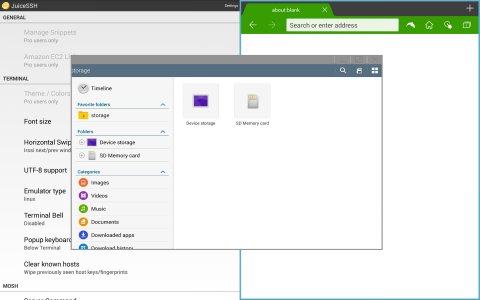
"JuiceSSH" and "Dolphin" side by side and "My Files" in pop up.
1. Activate multi window
2. Open one of the pre-installed apps like My Files
3. Open the side bar to select an app to view in multi window
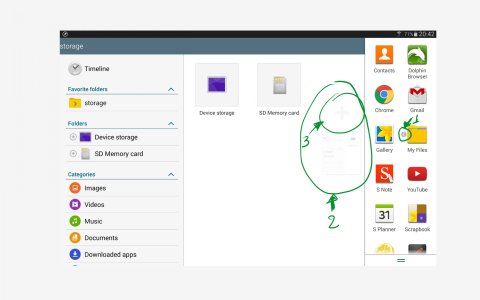
4. Select the app of point 2. This app will have in the left a small arrow (selection 1)
5. You'll see the selection 2
6. Choose the plus icon (selection 3)
"JuiceSSH" and "Dolphin" side by side and "My Files" in pop up.
1. Activate multi window
2. Open one of the pre-installed apps like My Files
3. Open the side bar to select an app to view in multi window
4. Select the app of point 2. This app will have in the left a small arrow (selection 1)
5. You'll see the selection 2
6. Choose the plus icon (selection 3)
Last edited:



 Facebook
 Twitter
 Instagram