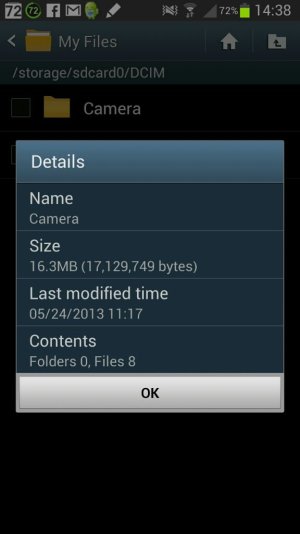
My DCIM camera folder says i have 1 gig of images but there isn'?

sterandroids

Member
Jan 18, 2013
24
0
0
So i was deleting some old apps and transferring some media files to my memory card to add space to my phone's internal memory. when i checked the storage of my internal memory, there was 0.9 gb of pictures in my internal memory:
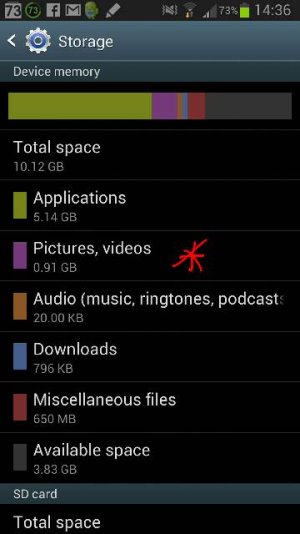
uploadfromtaptalk1369464030309.jpg

Sent from my GT-N7105 using Android Central Forums
 
sorry double post, its my first time posting pictures in a new topic via acf app.

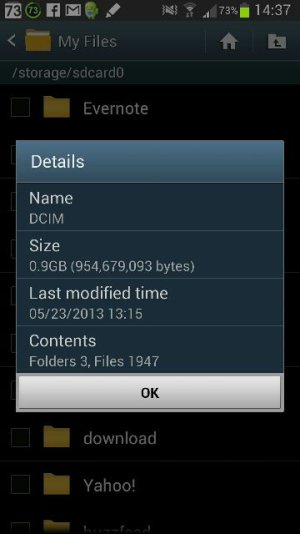
anyway, i looked down and saw that my folder DCIM was the folder containing the 0.9 gb of media files:

uploadfromtaptalk1369464148835.jpg

but when i open it. there were only a few photos that wouldnt total up to 0.9 gb.

uploadfromtaptalk1369464216724.jpg
uploadfromtaptalk1369464148835.jpg


how do i view this hidden file?

Sent from my GT-N7105 using Android Central Forums
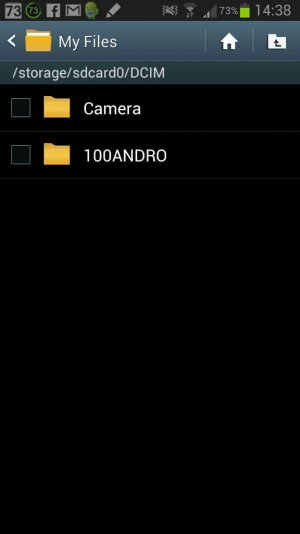
 

Attachments

  • uploadfromtaptalk1369464248790.jpg
    uploadfromtaptalk1369464248790.jpg
    44.4 KB · Views: 29
DCIM folder shows 1947 files. Looks like something's in there. If you're rooted then could try something like Root Explorer to see if anything else is visible.
 
Last edited:

Trending Posts

Members online

Forum statistics

Threads
963,223
Messages
6,992,879
Members
3,164,991
Latest member
slackingfred