A

You are using an out of date browser. It may not display this or other websites correctly.
You should upgrade or use an alternative browser.
You should upgrade or use an alternative browser.

- Mar 9, 2012
- 169,740
- 11,155
- 113
Welcome to Android Central! Can you show us a screenshot so we can see what you're talking about? http://forums.androidcentral.com/am...ide-how-post-screenshots-android-central.html
gressleybear
Member
- Jul 1, 2015
- 8
- 0
- 0
- Mar 9, 2012
- 169,740
- 11,155
- 113
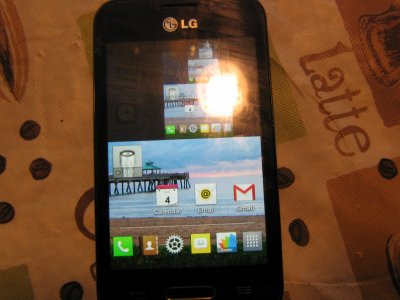
I can see a shortcut icon faintly in the background, and the recursive nested images look like a screenshot of a screenshot of a screenshot. Are you sure this wasn't happening when you were following the previous instructions on how to take a screenshot?
What happens if you tap the Back or Home button? Or if you reboot the phone?
What happens if you tap the Back or Home button? Or if you reboot the phone?
gressleybear
Member
- Jul 1, 2015
- 8
- 0
- 0
- Mar 9, 2012
- 169,740
- 11,155
- 113
Sorry, I'm a bit confused--when you say the Back and Home button work, do you mean that all of the multiple screens respond correctly, but they just don't become a single screen?
I'll be honest, I have no idea what's going on there. It reminds me of one of those screenshots of a screenshot of a screenshot that gives you the infinite tunneling effect, but it sounds like those multiple screens are interactive, correct?
I'll be honest, I have no idea what's going on there. It reminds me of one of those screenshots of a screenshot of a screenshot that gives you the infinite tunneling effect, but it sounds like those multiple screens are interactive, correct?
- Mar 9, 2012
- 169,740
- 11,155
- 113
One of my Ambassador colleagues thought that it might be a problem with the GPU (i.e., a hardware problem). At this point, you might want to try a full factory reset (by going to Settings>Backup & Reset. Make sure all of your important data is backed up or synced beforehand.
gressleybear
Member
- Jul 1, 2015
- 8
- 0
- 0
Latest posts
-
 Let's see your Pixel 10 and 10 Pro photos!
- Latest: YankInDaSouth
-
-
-


Members online
Total: 6,877 (members: 8, guests: 6,869)
Forum statistics

Space.com is part of Future plc, an international media group and leading digital publisher. Visit our corporate site.
© Future Publishing Limited Quay House, The Ambury, Bath BA1 1UA. All rights reserved. England and Wales company registration number 2008885.
 Facebook
 Twitter
 Instagram