M missdorado26 Well-known member Oct 19, 2013 80 0 0 Oct 21, 2013 #21 I figured out how to get the screen shot but now don't know how to upload here. There's only a reply and submit button but don't see anything else Posted via Android Central App
I figured out how to get the screen shot but now don't know how to upload here. There's only a reply and submit button but don't see anything else Posted via Android Central App
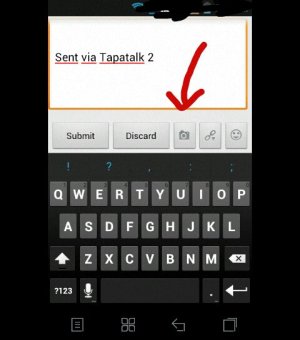
gdmin Well-known member Sep 16, 2013 220 0 0 Oct 21, 2013 #22 There you go... Sent via Tapatalk 2 Attachments uploadfromtaptalk1382317561494.jpg 39 KB · Views: 71
M missdorado26 Well-known member Oct 19, 2013 80 0 0 Oct 21, 2013 #23 I don't see that screen. Just got that app but now I cash by Find the same pages and topic on there. I give up lol Posted via Android Central App
I don't see that screen. Just got that app but now I cash by Find the same pages and topic on there. I give up lol Posted via Android Central App
A archer75 Well-known member Apr 22, 2013 199 0 0 Oct 21, 2013 #24 missdorado26 said: I don't see that screen. Just got that app but now I cash by Find the same pages and topic on there. I give up lol Posted via Android Central App Click to expand... Go to your desktop and do it. Dropbox. Snap a photo and it's instantly in the cloud and on your desktop.
missdorado26 said: I don't see that screen. Just got that app but now I cash by Find the same pages and topic on there. I give up lol Posted via Android Central App Click to expand... Go to your desktop and do it. Dropbox. Snap a photo and it's instantly in the cloud and on your desktop.
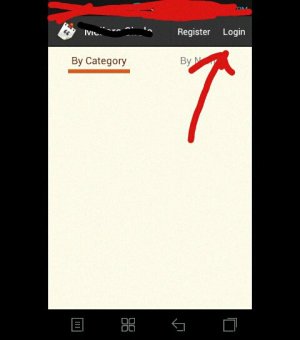
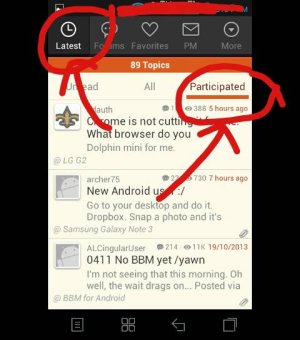
gdmin Well-known member Sep 16, 2013 220 0 0 Oct 21, 2013 #25 Since you said you got the app... here's how to... 1. Search this forum (android central) and then click login. 2. Look at the participated tab. 3. To upload pic just look at my previous image. Sent via Tapatalk 2 Attachments uploadfromtaptalk1382361086613.jpg 28.7 KB · Views: 38 uploadfromtaptalk1382361193309.jpg 36.3 KB · Views: 38
Since you said you got the app... here's how to... 1. Search this forum (android central) and then click login. 2. Look at the participated tab. 3. To upload pic just look at my previous image. Sent via Tapatalk 2





 Facebook
 Twitter
 Instagram