New Note 4 and Android User needing help with Samsung Link

swimmer160

Member
Nov 12, 2012
15
0
0
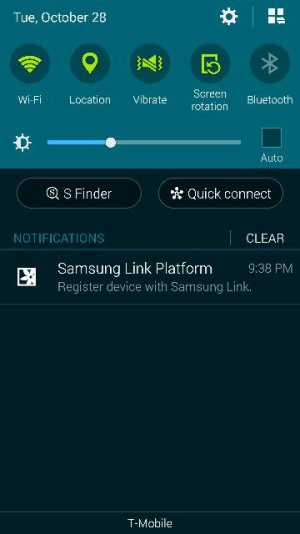
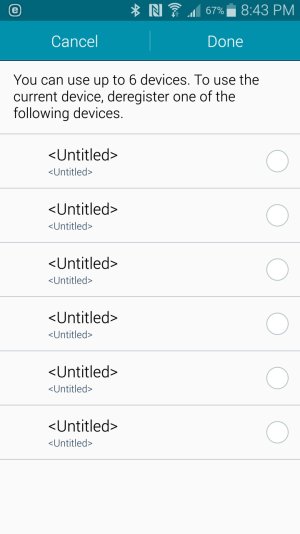
Hey all, so I'm new to the Android thing, and coming from Windows Phone, and I've been enjoying the experience so far, but I've got a question. I keep seeing this Samsung Link Platform message pop up telling me to register the device with Samsung Link. When I open it up it shows 6 slots, all saying <Untitled> with a radio button next to it (see photo). Tapping any of the buttons don't really do anything, and I can't find anything in the settings to disable it, or find anything out about it. Can someone help me out and tell me what this is all about and how to either register or deactivate it?
 

Attachments

  • Screenshot_2014-10-30-20-43-27.jpg
    Screenshot_2014-10-30-20-43-27.jpg
    113.7 KB · Views: 62
I don't know what the app does, but if you want to disable it altogether go into Settings > Applications > Application Manager > find Samsung Link (I have 2 related apps showing), then go into each & tap the Turn Off button.

Hopefully that takes care of it for you.

If you find any other app acting up because of this, you may have to turn them back on.
 
Hey all, so I'm new to the Android thing, and coming from Windows Phone, and I've been enjoying the experience so far, but I've got a question. I keep seeing this Samsung Link Platform message pop up telling me to register the device with Samsung Link. When I open it up it shows 6 slots, all saying <Untitled> with a radio button next to it (see photo). Tapping any of the buttons don't really do anything, and I can't find anything in the settings to disable it, or find anything out about it. Can someone help me out and tell me what this is all about and how to either register or deactivate it?

Ditto. Curious as well.

Posted via the Android Central App
 
I don't know what the app does, but if you want to disable it altogether go into Settings > Applications > Application Manager > find Samsung Link (I have 2 related apps showing), then go into each & tap the Turn Off button.

Hopefully that takes care of it for you.

If you find any other app acting up because of this, you may have to turn them back on.

Will there be something that tells me I need to turn it back on from something else not working properly?

Also, another question, is swiping my hand across the screen the only way to take screenshots, or is that it?

Posted via the Android Central App
 
Will there be something that tells me I need to turn it back on from something else not working properly?

Na. If it happens at all, it'll just be some weird message that doesn't seem to make much sense or an app not working properly. I wouldn't worry about it.

Also, another question, is swiping my hand across the screen the only way to take screenshots, or is that it?

There are actually 2 other ways - using a combination of the physical buttons (I don't remember which cause I never use that way) & using the S-pen (when the air command comes up, choose Screen write but don't actually write on it, just save it using the check mark at the top right).
 
Hey all, so I'm new to the Android thing, and coming from Windows Phone, and I've been enjoying the experience so far, but I've got a question. I keep seeing this Samsung Link Platform message pop up telling me to register the device with Samsung Link. When I open it up it shows 6 slots, all saying <Untitled> with a radio button next to it (see photo). Tapping any of the buttons don't really do anything, and I can't find anything in the settings to disable it, or find anything out about it. Can someone help me out and tell me what this is all about and how to either register or deactivate it?
Here's a link that explains what Samsung link is and how to use it if you have a need Samsung Link | Samsung Content & Services

To take a screen shot you can use the palm swipe, Spen with Air Command, or simultaneously press and hold the Home button and the Power sleep/wake button.
 
Still don't get it can someone post a picture how to turn off is very annoying. Keep popping no reason at all.
Thank you

Posted via the Android Central App
 
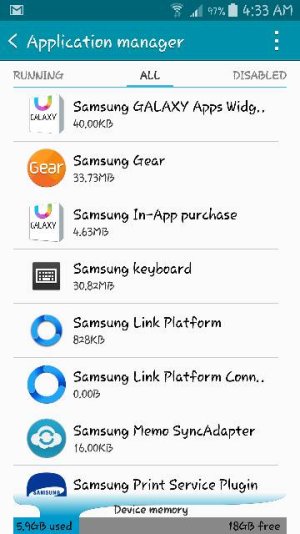
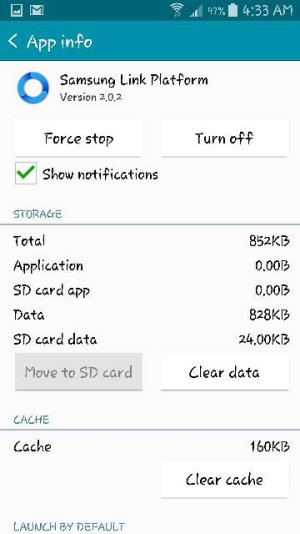
Under settings click applications then application mamager, slide over to all, the go to samsung link. Click it and push turn off.

Posted via the Android Central App
 

Attachments

  • Screenshot_2014-11-05-04-33-19.jpg
    Screenshot_2014-11-05-04-33-19.jpg
    37.1 KB · Views: 36
  • Screenshot_2014-11-05-04-33-29.jpg
    Screenshot_2014-11-05-04-33-29.jpg
    26.8 KB · Views: 36
The problem I don't even have the samsung link platform in aplication manager like your picture. but i still get the notification. I don't even know where to begin to turn it off.

Posted via the Android Central App
 

Attachments

  • Screenshot_2014-10-28-21-40-05.jpg
    Screenshot_2014-10-28-21-40-05.jpg
    21 KB · Views: 33
Never mind may bad. dumb dumb me thanks for the tip and pix

Posted via the Android Central App
 
How about media volume keep frozen time to time any tips. Very annoying to restart the phone all the time. Thank you

Posted via the Android Central App
 
Hey all, so I'm new to the Android thing, and coming from Windows Phone, and I've been enjoying the experience so far, but I've got a question. I keep seeing this Samsung Link Platform message pop up telling me to register the device with Samsung Link. When I open it up it shows 6 slots, all saying <Untitled> with a radio button next to it (see photo). Tapping any of the buttons don't really do anything, and I can't find anything in the settings to disable it, or find anything out about it. Can someone help me out and tell me what this is all about and how to either register or deactivate it?
 

Trending Posts

Members online

Forum statistics

Threads
959,752
Messages
6,980,104
Members
3,164,299
Latest member
tech gropse