
NFC won't work after 4.4.3 update from Verizon
- Thread starter ModernTenshi04
- Start date
You are using an out of date browser. It may not display this or other websites correctly.
You should upgrade or use an alternative browser.
You should upgrade or use an alternative browser.
Deepak Sanjay
Member
- Oct 5, 2014
- 12
- 0
- 0
Thanks for the response, Anything and everything helps,
Do you have a Verizon HTC One M8? I know this thread is started for a Verizon version. But I just want to be sure. It will be comforting to know that it is working for others and I am just an exception or in the minority who is affected by this, since it will help me eliminate the blame on the software and focus on a hardware, warrant replacement.
Thank You.
Do you have a Verizon HTC One M8? I know this thread is started for a Verizon version. But I just want to be sure. It will be comforting to know that it is working for others and I am just an exception or in the minority who is affected by this, since it will help me eliminate the blame on the software and focus on a hardware, warrant replacement.
Thank You.
Benjamin_NYC
Banned
- May 15, 2014
- 1,068
- 0
- 0
My guess is Verizon f'cked up the 4.4.3 update and disabled Google Wallet again. Why anyone suffers through Verizon is beyond me. Move on to a better carrier, and you'll have no problems with Wallet.
Posted via the Android Central App
Posted via the Android Central App
Deepak Sanjay
Member
- Oct 5, 2014
- 12
- 0
- 0
My guess is Verizon f'cked up the 4.4.3 update and disabled Google Wallet again. Why anyone suffers through Verizon is beyond me. Move on to a better carrier, and you'll have no problems with Wallet.
Posted via the Android Central App
I hear you loud and clear. But not everyone is fortunate enough to be covered by the other 3 carriers. AT&T is the next best carrier and even they do not have much of a signal in the boonies. I live in Michigan, and travel a lot, drive that is and having a solid signal in places that I travel is a life saver to me. Moreover the places I work and play are only covered by Verizon in Michigan. The rest of them have it too, but with HSPA+ or 3g, 1xrt respectively and the call quality and data ping is not consistent.
I was a happy camper in NYC with T-Mobile. But soon I moved to Michigan, I realized I am donating free money to T-Mo for not using their service as I should. So I got away after the contract.
I agree with you. Verizon has the tendency to screw things up with updates. I have reset my phone yet again. Will try one more time before I go into the store for warranty support.
Last edited:
Deepak Sanjay
Member
- Oct 5, 2014
- 12
- 0
- 0
Just went to CVS and tried my Google Wallet. Wholla, it worked. So the second reset seemed to have fixed the problem. Or did it? I am not sure, only time will tell. I will keep on trying once in a while to be sure that it is not just a fluke.
Here is what I did.
The HTC rep (the second one that is, first one was dumb and rude due to her limited understanding) asked me to reset the phone once more, and when the phone booted up, I unchecked the Settings > Power > Fastboot option. Disabled Softcard/ISIS Wallet in App settings, Installed Google Wallet again. And all seems to be in order now. Not sure what caused the initial trouble.
I will be on the look and report if the trouble comes back again.
Thanks for the suggestions and feedback guys.
Here is what I did.
The HTC rep (the second one that is, first one was dumb and rude due to her limited understanding) asked me to reset the phone once more, and when the phone booted up, I unchecked the Settings > Power > Fastboot option. Disabled Softcard/ISIS Wallet in App settings, Installed Google Wallet again. And all seems to be in order now. Not sure what caused the initial trouble.
I will be on the look and report if the trouble comes back again.
Thanks for the suggestions and feedback guys.
Deepak Sanjay
Member
- Oct 5, 2014
- 12
- 0
- 0
I bit the bullet and did a factory reset...still no NFC. Any suggestion? The phone is not rooted. Could rooting the phone be a possible solution?
You would not have to root the phone to use what it was supposed to do by default. Did you try what worked for me?
The HTC rep (the second one that is, first one was dumb and rude due to her limited understanding) asked me to reset the phone once more, and when the phone booted up, I unchecked the Settings > Power > Fastboot option. Disabled Softcard/ISIS Wallet in App settings, Installed Google Wallet again. And all seems to be in order now. Not sure what caused the initial trouble.
If the problem still persists, it can be a hardware failure. If Verizon will not work with you on a Warranty replacement, Call : 866-449-8358 from 8 am to 1 am ET and initiate troubleshooting. Call from another phone, since troubleshooting often involves in rebooting your phone, which may lead to disconnection from your support rep. Once all fails, they will give you 3 Options.
1. Send in your phone at your expense, 12-16 Bucks USPS the last time I did it, which they will fix and return in 10-14 business days.
2. Send in your phone at your expense, HTC will charge you 19 dollars to expedite repair and ship you sooner. I am not sure of the return time to be exact. But expect a week.
3. 29 dollar one time payment for overnight shipping of a new device. They will send a new/refurb phone overnight if called before 4pm central time. But they will also put a hold on your credit card for 599 dollars till they receive your defective unit. They also ship a paid mailer label so you wont incur a return shipping fee.
I was going to pick the 3rd option, so that I do not have a down time without phone. But thank heavens my phone decided to work now saving me from the hassle of restoring my apps, settings and such.
Good Luck mate. Hope it works out for you.

rfmike
Well-known member
- Dec 2, 2009
- 212
- 1
- 0
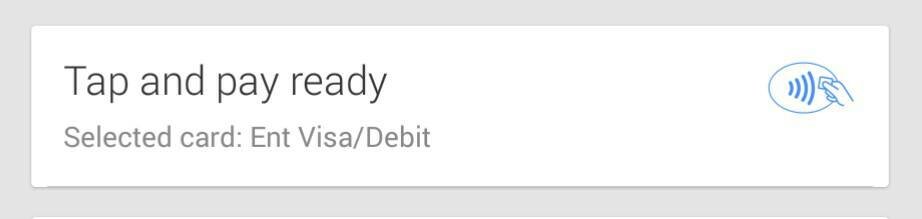
So I've been reading this post for a while now. I updated my M8 on Verizon the day the software went live. I've had no problems, I use my Tap & Pay at Kum and Go all the time. I have noticed that after the update an updated wallet app.... You can no longer use you Google wallet (Card) as a Tap & Pay through the phone.
You now must use a debt or credit card as your Tap & Pay card... But you can still oppt to have money used from your wallet Account 1st before charging your debt or credit card....
Sweetness.!!!
You now must use a debt or credit card as your Tap & Pay card... But you can still oppt to have money used from your wallet Account 1st before charging your debt or credit card....
Sweetness.!!!
Attachments
KeepItReal
Well-known member
- Feb 15, 2011
- 547
- 0
- 0
Have you tried Verizon's SoftCard (formerly ISIS). It has better security. I added it at the beginning, and got $40 for getting an American Express Serve card (and you get a real card in the mail). This Offer is over, but this prepaid card gives buying offers from time to time. Spend a $1, get a dollar back (up to $50) till Dec. I spent $40 at Verizon, got $20 back (an offer in Softcard, & I got the $1. I linked my back account to the American Serve Card so I can take advantage of these offers (only top $200). McDonald's takes the card, so I buy an unsweet tea for $1, get $1 back. I also took advantage of spend up too $200, get 20% back on card when that was offered. You can also add your Chase Credit Card, American Express Credit Card, Wells Fargo Credit Card. It was explain to me, that those recent credit card breaches would not of occurred if you had used Softcard (ISIS), as that 3 digit security number we may use, changes for every transaction, so a transaction could never be replicated. You have to use the phone swiping card to get the bonuses (not the actual card you get in mail).
Posted via the Android Central App
Posted via the Android Central App

tech_head
Q&A Team
- Aug 25, 2010
- 783
- 15
- 0
ISIS/SoftCard interferes with Wallet. If you have one enabled you typically cannot use the other.
You couldn't pay me to use SoftCard. The reason Wallet has been so messed up is that Verizon and AT&T didn't want Google Wallet as competition and claimed that accessing the secure element in the phone was problematic. So they blocked Wallet. And came out with a secure SIM.
Google found a workaround with a virtual secure element or "Host Care Emulation"; HCE.
I will never use SoftCard out of spite for Verizon and AT&T.
Too afraid to compete so they crippled the functionality.
Glad Google found a way around Verizon and AT&T.
You couldn't pay me to use SoftCard. The reason Wallet has been so messed up is that Verizon and AT&T didn't want Google Wallet as competition and claimed that accessing the secure element in the phone was problematic. So they blocked Wallet. And came out with a secure SIM.
Google found a workaround with a virtual secure element or "Host Care Emulation"; HCE.
I will never use SoftCard out of spite for Verizon and AT&T.
Too afraid to compete so they crippled the functionality.
Glad Google found a way around Verizon and AT&T.
Deepak Sanjay
Member
- Oct 5, 2014
- 12
- 0
- 0
So I've been reading this post for a while now. I updated my M8 on Verizon the day the software went live. I've had no problems, I use my Tap & Pay at Kum and Go all the time. I have noticed that after the update an updated wallet app.... You can no longer use you Google wallet (Card) as a Tap & Pay through the phone.
You now must use a debt or credit card as your Tap & Pay card... But you can still oppt to have money used from your wallet Account 1st before charging your debt or credit card....
Sweetness.!!!
Glad to hear it is working for you. It gives me a chance to isolate my case as hardware issue rather than focusing on the wallet apps alone.
Deepak Sanjay
Member
- Oct 5, 2014
- 12
- 0
- 0
ISIS/SoftCard interferes with Wallet. If you have one enabled you typically cannot use the other.
You couldn't pay me to use SoftCard. The reason Wallet has been so messed up is that Verizon and AT&T didn't want Google Wallet as competition and claimed that accessing the secure element in the phone was problematic. So they blocked Wallet. And came out with a secure SIM.
Google found a workaround with a virtual secure element or "Host Care Emulation"; HCE.
I will never use SoftCard out of spite for Verizon and AT&T.
Too afraid to compete so they crippled the functionality.
Glad Google found a way around Verizon and AT&T.
You are right. That's what I thought too. So I disabled the Softcard/ISIS app and then used the Google Wallet ( right after a hard reset of the phone ) and it worked. Now it isn't working anymore when I tried last night at a CVS Pharmacy. This is frustrating.
Deepak Sanjay
Member
- Oct 5, 2014
- 12
- 0
- 0
ISIS/SoftCard interferes with Wallet. If you have one enabled you typically cannot use the other.
You couldn't pay me to use SoftCard. The reason Wallet has been so messed up is that Verizon and AT&T didn't want Google Wallet as competition and claimed that accessing the secure element in the phone was problematic. So they blocked Wallet. And came out with a secure SIM.
Google found a workaround with a virtual secure element or "Host Care Emulation"; HCE.
I will never use SoftCard out of spite for Verizon and AT&T.
Too afraid to compete so they crippled the functionality.
Glad Google found a way around Verizon and AT&T.
I agree. Verizon and ATT, also T-Mobile is part of the ISIS crap. This is wrong that they have control over our devices that we paid for.
Deepak Sanjay
Member
- Oct 5, 2014
- 12
- 0
- 0
NFC No Longer Working - Again.
So as my previous post suggested, after a hard reset and disabling the Softcard/ISIS app, and having Google Wallet as the exclusive app, the tap and pay worked at the CVS. However, when I tried again last night, it is no longer working and not registering the tap anymore at the terminal.
I am confused. Is it the hardware? Should I go ahead with the replacement device from HTC? or Should I just blame the software and keep the phone as is. Although my contacts and account is backed up in Google accounts, I still think its a hassle reinstalling 50+ apps, and restoring the phone to its fully functional day to day state that suited me. I just do not like the hassle of swapping phones.
Any last suggestions guys? Or hardware swap is my only way?
So as my previous post suggested, after a hard reset and disabling the Softcard/ISIS app, and having Google Wallet as the exclusive app, the tap and pay worked at the CVS. However, when I tried again last night, it is no longer working and not registering the tap anymore at the terminal.
I am confused. Is it the hardware? Should I go ahead with the replacement device from HTC? or Should I just blame the software and keep the phone as is. Although my contacts and account is backed up in Google accounts, I still think its a hassle reinstalling 50+ apps, and restoring the phone to its fully functional day to day state that suited me. I just do not like the hassle of swapping phones.
Any last suggestions guys? Or hardware swap is my only way?
Benjamin_NYC
Banned
- May 15, 2014
- 1,068
- 0
- 0
Just went to CVS and tried my Google Wallet. Wholla, it worked. So the second reset seemed to have fixed the problem. Or did it? I am not sure, only time will tell. I will keep on trying once in a while to be sure that it is not just a fluke.
Here is what I did.
The HTC rep (the second one that is, first one was dumb and rude due to her limited understanding) asked me to reset the phone once more, and when the phone booted up, I unchecked the Settings > Power > Fastboot option. Disabled Softcard/ISIS Wallet in App settings, Installed Google Wallet again. And all seems to be in order now. Not sure what caused the initial trouble.
I will be on the look and report if the trouble comes back again.
Thanks for the suggestions and feedback guys.
Cool^
Posted via the Android Central App
Paul Spuria
New member
- Aug 22, 2012
- 1
- 0
- 0
i have a problem, i have an S3 mini and i put cyanogenmod 11 on it because i wont get a 4.4 update and the reason why i want 4.4 is for it to work with my gear 2 neo. cyanogenmod11 doesnt seem to have an on/off switch for NFC the original software did
i apologize if i am in the wrong topic my main issue is i lost nfc ability and going back to android 4.2.1 seems pointless and as of right now all i can do on the gear 2 neo is recieve calls like its a headset
i apologize if i am in the wrong topic my main issue is i lost nfc ability and going back to android 4.2.1 seems pointless and as of right now all i can do on the gear 2 neo is recieve calls like its a headset
- May 25, 2010
- 32
- 0
- 0
So after the latest firmware update a few days ago, which gave all M8s on Verizon Android 4.4.4, Google Wallet works on my phone again.
I uninstalled Google Wallet before installing the firmware update, reinstalled Wallet, and it's worked 4 times so far without any problems.
Figured something had to be up with Wallet itself, as I signed up for SoftCard just to see if that worked, and I was able to use SoftCard flawlessly. Wouldn't be such a bad NFC payment service if they were like Wallet and let me use any credit/debit card I have instead of having to load a digital wallet with money. Oh well, at least they proved my phone wasn't completely borked.
Just glad to be able to use Google Wallet again. Now that Apple Pay is up and running, more retailers should jump on board with NFC payments (hopefully). Sucks it'll likely take Apple adding tap-to-pay functionality to really jump start things, but in the end we all win.
I uninstalled Google Wallet before installing the firmware update, reinstalled Wallet, and it's worked 4 times so far without any problems.
Figured something had to be up with Wallet itself, as I signed up for SoftCard just to see if that worked, and I was able to use SoftCard flawlessly. Wouldn't be such a bad NFC payment service if they were like Wallet and let me use any credit/debit card I have instead of having to load a digital wallet with money. Oh well, at least they proved my phone wasn't completely borked.
Just glad to be able to use Google Wallet again. Now that Apple Pay is up and running, more retailers should jump on board with NFC payments (hopefully). Sucks it'll likely take Apple adding tap-to-pay functionality to really jump start things, but in the end we all win.
Deepak Sanjay
Member
- Oct 5, 2014
- 12
- 0
- 0
Just went to CVS and tried my Google Wallet. Wholla, it worked. So the second reset seemed to have fixed the problem. Or did it? I am not sure, only time will tell. I will keep on trying once in a while to be sure that it is not just a fluke.
Here is what I did.
The HTC rep (the second one that is, first one was dumb and rude due to her limited understanding) asked me to reset the phone once more, and when the phone booted up, I unchecked the Settings > Power > Fastboot option. Disabled Softcard/ISIS Wallet in App settings, Installed Google Wallet again. And all seems to be in order now. Not sure what caused the initial trouble.
I will be on the look and report if the trouble comes back again.
Thanks for the suggestions and feedback guys.
Update - Got rid of the HTC One M8, swapped for a Galaxy S5 on craigslist and guess what, Google wallet works fine there. Yes, although that is a Verizon phone as well, grass is definitely greener on that side. I do not like the menu system and UI, color etc, but what it supposed to do, it does without any issues.
Similar threads
- Replies
- 1
- Views
- 2K


- Replies
- 2
- Views
- 2K


- Replies
- 10
- Views
- 5K


Trending Posts
-
-
2 Questions - wait for S26? And text transfers....
- Started by fuzzywuzzywazzafuzzy
- Replies: 3
-
-
 Getting your voicemails sent to your e-mail also
- Started by lgbalfa
- Replies: 1
-
Members online
Total: 3,101 (members: 10, guests: 3,091)
Forum statistics

Space.com is part of Future plc, an international media group and leading digital publisher. Visit our corporate site.
© Future Publishing Limited Quay House, The Ambury, Bath BA1 1UA. All rights reserved. England and Wales company registration number 2008885.
 Facebook
 Twitter
 Instagram