Note 4 App drawer folders, finally

Re: App drawer folders, finally

It can folder apps within the App Drawer instead of just on home screens.

Also, you can disable and uninstall apps from the app drawer, on the fly.

You can also hide apps within the app drawer, and see them in a seperate hidden folder by clicking the three dots and selecting View Hidden apps.

Posted via the Android Central App
 
Re: App drawer folders, finally

It can folder apps within the App Drawer instead of just on home screens.

Also, you can disable and uninstall apps from the app drawer, on the fly.

You can also hide apps within the app drawer, and see them in a seperate hidden folder by clicking the three dots and selecting View Hidden apps.

Posted via the Android Central App

Wish I knew what the hell you ment. What's a app drawer etc. screen shots will explain it
 
Re: App drawer folders, finally

Wish I knew what the hell you ment. What's a app drawer etc. screen shots will explain it

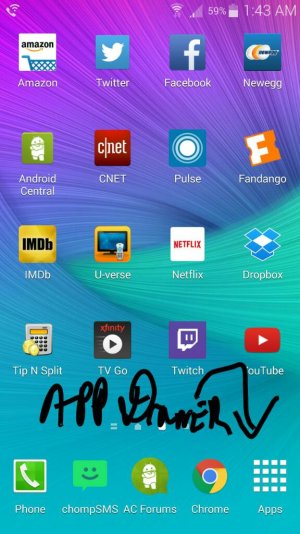
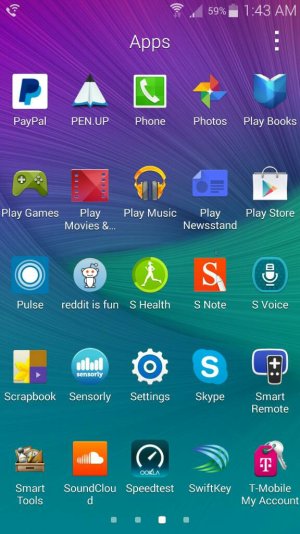
The app drawer is the thing at the bottom of the phone (see below).

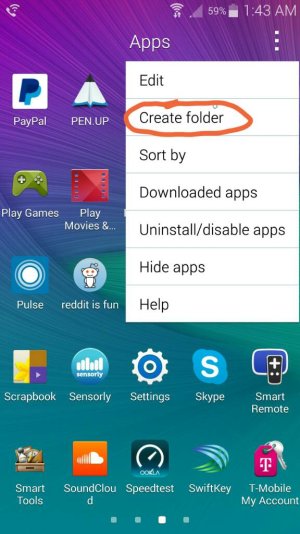
I can confirm on my T-Mobile Note 4 you can create folders (see the last picture below) :).
 

Attachments

  • 1413265507717.jpg
    1413265507717.jpg
    83.5 KB · Views: 99
  • 1413265516338.jpg
    1413265516338.jpg
    78.7 KB · Views: 99
  • 1413265525197.jpg
    1413265525197.jpg
    73.7 KB · Views: 99
Re: App drawer folders, finally

The app drawer is the thing at the bottom of the phone (see below).

I can confirm on my T-Mobile Note 4 you can create folders (see the last picture below) :).

Cheers looks the dogs by the way,
 
Re: App drawer folders, finally

That's not new. You can do that on the Note 3.
 
Re: App drawer folders, finally

Gonna bump this.

Anyone been running into problems with this after re-booting the phone? My GF's Note will empty all the folder apps back into the main app drawer after every re-boot.
It's frustrating for her since she's forced to re-boot due to lag.
 
Re: App drawer folders, finally

How do you delete a folder in the app drawer?
While in the APP Drawer, select the three dots, menu, and then select Remove folder, or something similar. Then it will present the folders that have been created. Select the one you want to delete and then say DONE.
Good Luck!
Ron
 
Re: App drawer folders, finally

While in the APP Drawer, select the three dots, menu, and then select Remove folder, or something similar. Then it will present the folders that have been created. Select the one you want to delete and then say DONE.
Good Luck!
Ron

Thanks. I figured it out shortly after asking,
 

Trending Posts

Members online

Forum statistics

Threads
962,248
Messages
6,989,520
Members
3,164,794
Latest member
Ninja01