I have searched everywhere trying to find an answer to this problem. All of the sudden when I get any type of notification (text, call, etc...) The app icon doesn't show up at the top on my notification bar. Now a little "tag" or "arrow" with 3 dots shows up. I only know what kind of notification it is until I swipe down from the top. Any suggestions on how to fix/get rid of this?? I am running Android 7.1.1 on a ZTE Axon 7 Thanks! I have a picture, but I don't know how to post a picture with this post.

Notifications are being hidden in my notification bar
- Thread starter cory8465
- Start date
You are using an out of date browser. It may not display this or other websites correctly.
You should upgrade or use an alternative browser.
You should upgrade or use an alternative browser.
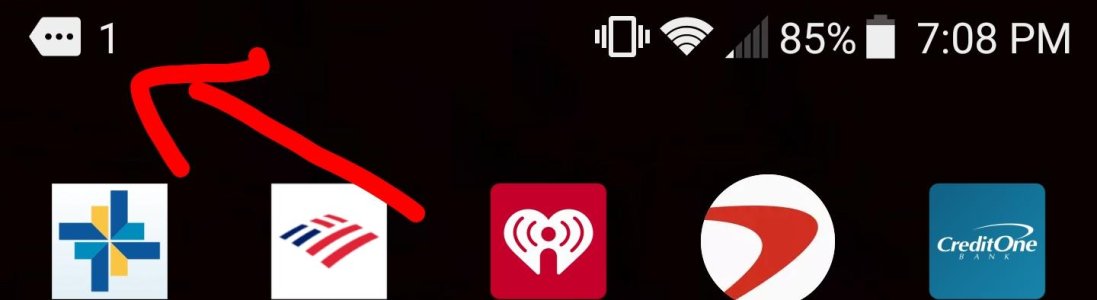
Thank you for the reply Javier! Nothing happens when I click/tap it. I have to swipe down to see what notification I have (whether that's a missed call/text/kik etc...) It used to be when I would get a notification, for example kik, it would put the icon up there. Or if it was a missed call, the phone icon. Now when I get even a single notification, it automatically does this instead.

Javier P
Ambassador
- Feb 21, 2014
- 19,478
- 6
- 0
Strange. That icon usually means that there's not enough room on the status bar for all your pending notifications. That's not your case, though. Have you recently installed any new app or received a system update?
You could try clearing cache data in settings - storage and then restart the phone.
You could try clearing cache data in settings - storage and then restart the phone.
Javier P
Ambassador
- Feb 21, 2014
- 19,478
- 6
- 0
You can also try safe mode. This will give you a clue about the cause of the problem - some bug in the system or a conflict with a third party app.I haven't tried clearing out my cache. I haven't gotten any updates either. I did download a few new apps. I'll try the cache first, then I'll look into the apps I downloaded. Crossing my fingers....
Javier P
Ambassador
- Feb 21, 2014
- 19,478
- 6
- 0
Uninstalled every app I don't use and recently downloaded ones. Also cleared out the cache in all my apps. I guess it's on to Safe Mode. Once in safe mode, how do you check to see if there is anything in conflict or an issue with any of the apps I have?
You can make someone call or text you after booting in safe mode and see if you get the same notification.
I uninstalled all recently downloaded apps and even apps I don't use anymore. I cleared out the cache of all my apps and I also loaded it in Safe Mode and nothing worked. Even in safe mode, I had my girlfriend send me a message and it immediately showed the same icon.
Javier P
Ambassador
- Feb 21, 2014
- 19,478
- 6
- 0
Mmmm. That means it's a bug in the system or some setting and not a conflict with an app. I'll search a bit and let you know what I find.I uninstalled all recently downloaded apps and even apps I don't use anymore. I cleared out the cache of all my apps and I also loaded it in Safe Mode and nothing worked. Even in safe mode, I had my girlfriend send me a message and it immediately showed the same icon.
Last edited:
Javier P
Ambassador
- Feb 21, 2014
- 19,478
- 6
- 0
Wait, try this. Go to settings - display and disable 'Only show quantity in status bar'.I uninstalled all recently downloaded apps and even apps I don't use anymore. I cleared out the cache of all my apps and I also loaded it in Safe Mode and nothing worked. Even in safe mode, I had my girlfriend send me a message and it immediately showed the same icon.
Javier P
Ambassador
- Feb 21, 2014
- 19,478
- 6
- 0
Hahaha. Glad it helped and thanks for the follow up. See you around the forums.That worked! Duude, thank you soo much lol. I would have never found that setting lol


Trending Posts
-
How to Convert region from China to Global - IQOO Z10 Turbo Pro
- Started by lencaiboncai178
- Replies: 0
-

-

-
Forum statistics

Space.com is part of Future plc, an international media group and leading digital publisher. Visit our corporate site.
© Future Publishing Limited Quay House, The Ambury, Bath BA1 1UA. All rights reserved. England and Wales company registration number 2008885.
 Facebook
 Twitter
 Instagram