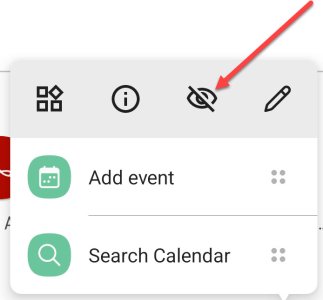
N neil154 Well-known member Mar 9, 2011 506 1 0 Nov 26, 2021 #1 I would like to know what the icon on the Nova Launcher edit screen (looks like a circle with a line through it) does. It seems to hide the app but not sure and also don't see how to undo it. Any ideas?
I would like to know what the icon on the Nova Launcher edit screen (looks like a circle with a line through it) does. It seems to hide the app but not sure and also don't see how to undo it. Any ideas?
mustang7757 Admin Moderator Moderator Feb 6, 2017 98,798 15,402 113 Nov 26, 2021 #2 Are you in beta ? I dont have the option Upvote 0 Downvote
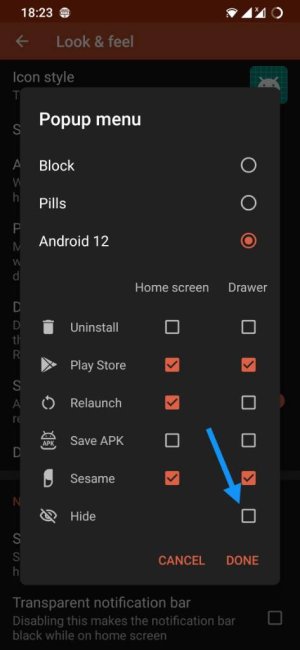
Javier P Ambassador Feb 21, 2014 19,478 6 0 Nov 26, 2021 #3 That's the option to hide apps. You can remove it from the popup menu in Nova settings - Look & Feel - Popup menu. Upvote 0 Downvote
That's the option to hide apps. You can remove it from the popup menu in Nova settings - Look & Feel - Popup menu.
mustang7757 Admin Moderator Moderator Feb 6, 2017 98,798 15,402 113 Nov 26, 2021 #4 Javier P said: That's the option to hide apps. You can remove it from the popup menu in Nova settings - Look & Feel - Popup menu. View attachment 339310 Click to expand... Ahh didn't know that Upvote 0 Downvote
Javier P said: That's the option to hide apps. You can remove it from the popup menu in Nova settings - Look & Feel - Popup menu. View attachment 339310 Click to expand... Ahh didn't know that






 Facebook
 Twitter
 Instagram