Gayle Lynn
Well-known member
- Jun 20, 2016
- 1,780
- 0
- 0
Pop up notification in app.
Found it. Advanced features:smart pop-up view
another tip for my note 9 members
this is for people on pie
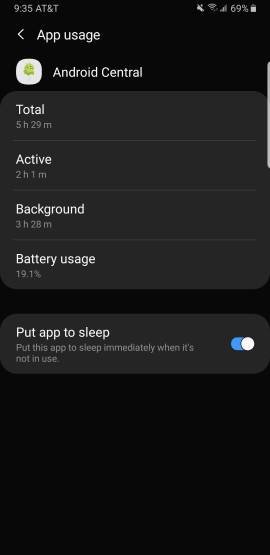
device care tap battery now look at the app is the highest in the list not if you click on it you can toggle it to sleep when not in use so wont drain battery in the background , wouldn't do this for things you need immediate alerts like mail ect..
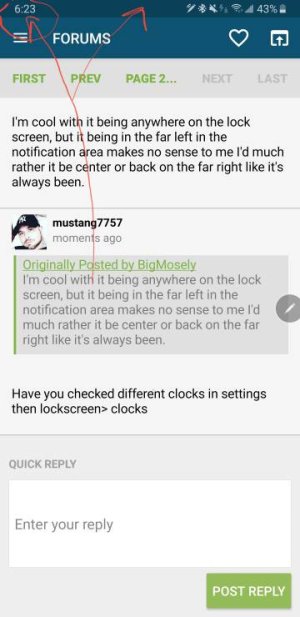
Anyone know how to center the clock? It being on the left with the notifications keeps making me think I have unread notifications.
For lock screen it moves to prevent screen burn in .
I'm cool with it being anywhere on the lock screen, but it being in the far left in the notification area makes no sense to me I'd much rather it be center or back on the far right like it's always been.
Have you checked different clocks in settings then lockscreen> clocks
I must not be using the right terminology, it's the clock in the upper bar not in the lock screen that I'd like to change. I used to use Swift Installer for this but it doesn't seem to work on Pie.
Gotcha now ..no can't be moved
Hopefully Swift Installer gets working on Pie eventually.
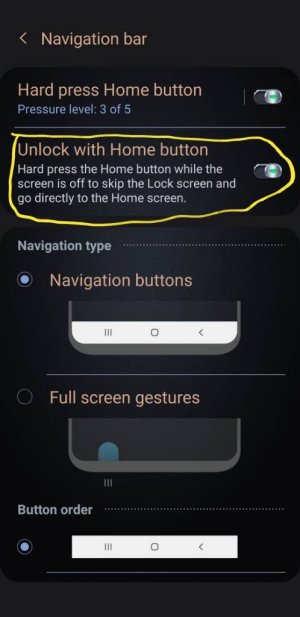
I have the"home button" turned off on the AOD settings yet the screen still turns on if you press the location of the home button. Where is the setting to completely turn off the AOD home button?