Peeps, i need help

Evilguppy

Well-known member
Mar 28, 2014
433
0
0
Currently, my photos are rectangular and when I post them on IG, I get a square duplicate which takes a lot of room. I forgot which settings I need to get into to change the pics format to square so it matches IG and won't crowd my storage space with a duplicate. It's a royal PITA to constantly have to delete the duplicates.
 
Well, I'm not sure about IG's requirements, but at the top of your camera's screen you'll see a ratio in vertical brackets (3:4, 9:16, 1:1) (9:16 is the full screen size, 3:4 is still a rectangle but much shorter and what I use and 1:1 is obviously square) hope that helps! Experiment!!!
 
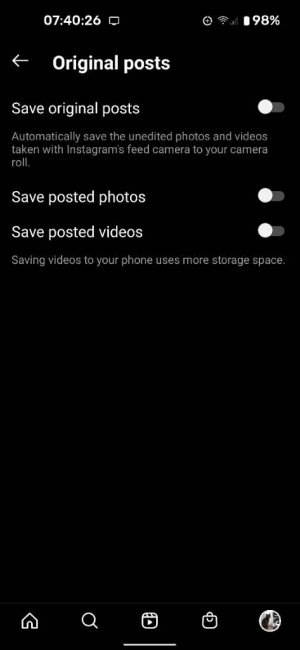
To stop creating duplicate photos go to settings, account, original posts and toggle the switch. This is in the Instagram app I am talking about.

Screenshot_20210308-074027.jpg
 

Members online

Forum statistics

Threads
961,267
Messages
6,985,559
Members
3,164,691
Latest member
AndreaRose851