phantom wifi networks

wnbowman

New member
May 13, 2014
2
0
0
I don't know if anyone else is having this issue or not, I haven't stumbled across any trying to search for it, but here goes.

Phone is at 4.4.2 KitKat, and in my WiFi networks, there are networks listed that my phone picked up while driving past. I never connected to any of them (WPS available or secured), but none of them are in my networks where I can delete them. Any ideas? Thanks in advance.
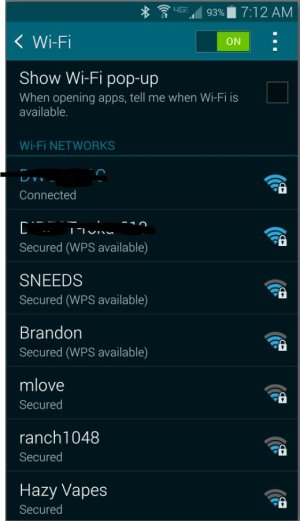
Capture.JPG
 
If you long press on those "phantom's WiFi's " as you call them ,Is there an option to forget them? (you see in the pop up box) .I not positive that option shows when you actually have connected to them though .
Also in the Advanced WiFi setttings : you could tick the option Scanning always available to off .
Advanced settings touch 3 dots in lower right circled in red in screenshot
9asy7u8u.jpg

Then toggle always scanning off
yjeru8yv.jpg


Just a suggestion though (personal preference) :)
 
Last edited:
Thanks for the suggestion. I am not able to "forget" these networks. My only option is Connect. I have rebooted my phone several times, but they will not go away.

Posted via Android Central App
 
Same problem. Two wi-fi networks from the laundromat across the street from my office appear in the wi-fi network list all the time, everywhere. Ironically, the signal strength appears to be "strongest" when I'm miles away than when the network is actually in range.

Any solutions?
 
Same problem. Two wi-fi networks from the laundromat across the street from my office appear in the wi-fi network list all the time, everywhere. Ironically, the signal strength appears to be "strongest" when I'm miles away than when the network is actually in range.

Any solutions?
Same issue here. It did not happen before AT&T updated 4.4.2. last week.
 

Trending Posts

Forum statistics

Threads
962,027
Messages
6,988,775
Members
3,164,764
Latest member
nysmarkets
