Phone Idle is draining my battety!

  • Thread starter Thread starter AC Question
  • Start date Start date
A

AC Question

I've been having this issue for over a month now. I have a year old Galaxy 6S. worked wonderfully until now. I charge the phone to a full battery and even with no use, that battery is completely dead within 4-5 hours. Example, last night I charged it before bed. Turned on Power saving mode, phone was connected to wifi, blue tooth turned off, all apps closed and woke up to the phone off with no battery whatsoever. No water damage.......what gives? Phone Idle, cell standby and Android is are the main culprits. How can I go back to the way things used to be?
 
Welcome to Android Central! Charge up to 100%, then let it drain to 20-30% with normal usage, without charging in between. Then show us:

1. The main Settings>Battery screen.
2. The fullscreen battery graph screen (which shows Awake time and Cell Signal Strength).
3. The Screen category (to see total Screen On time).
4. The Cell Standby category, if present (to see Time Without Signal).

http://forums.androidcentral.com/ge...ide-how-post-screenshots-android-central.html

You might have to install a 3rd party battery monitor, like GSam Battery Monitor, to get the Cell Signal Strength graph.
 
Tried clearing the Cache belodian....ran the same scenario last night and had the same outcome.

B. Diddy, I will post a screen shot in about three hours, lol. Thank you both!
 
Last edited by a moderator:
B. Diddy, I am unable to do the screenshot - whether through a computer or my phone. Anyways, I am at work at time is limited so the dets are below.....

Recent Battery Usage: 5H 8M 45s on battery / Android OS - 38% / Screen - 15% / Cell Standby 11% / Chrome - 10% / Google Services - 10% / Phone Idle - 8%

Screen Details: Time On - 14m 52s Computed power usage 40mAh

Cell Standby Details: Total Connection time 5m 3s Computed power usage 31mAh

I've been at work all morning and am not connected to wifi. Phone has been primarily unused. A total of three text messages were sent. Screen brightness has been primarily on the lowest setting because if I select "Auto" the brightness automatically goes to high no matter what light I am in, which expedites the battery drain and makes the phone unbearably hot.
 
There a few common causes of battery drain. Apps running in the background and checking for updates/notifications, for example email apps and Facebook. Being in a weak cell area with an intermittent signal, as your phone searches for signal, or changes frequencies (3G, 4G, LTE, etc), battery drains. As the battery ages it is just not as efficient as it once was.
 
It's difficult to determine the significance of that battery data, since it's incomplete. What battery level was the phone at the time, and did you start at 100%?
 
Can you see what your cell signal has been like over the course of a battery cycle? You might have to use a 3rd party battery monitor like GSam Battery Monitor to get that info.
 
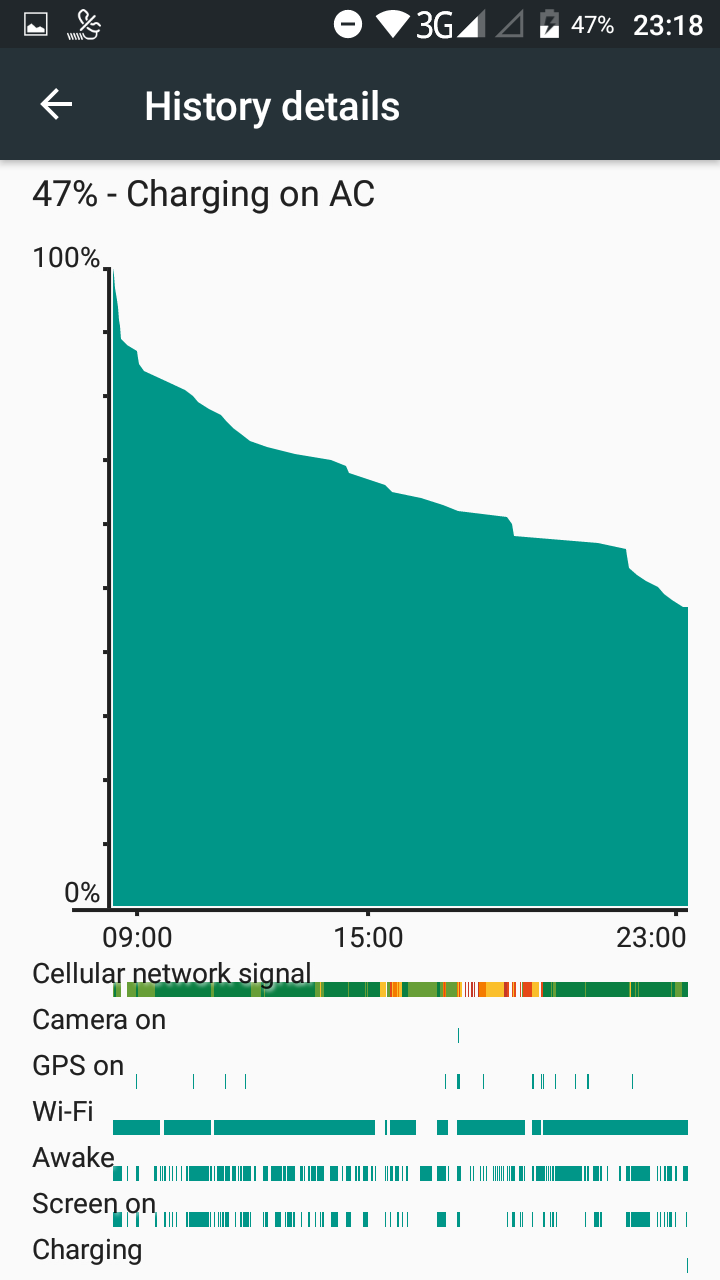
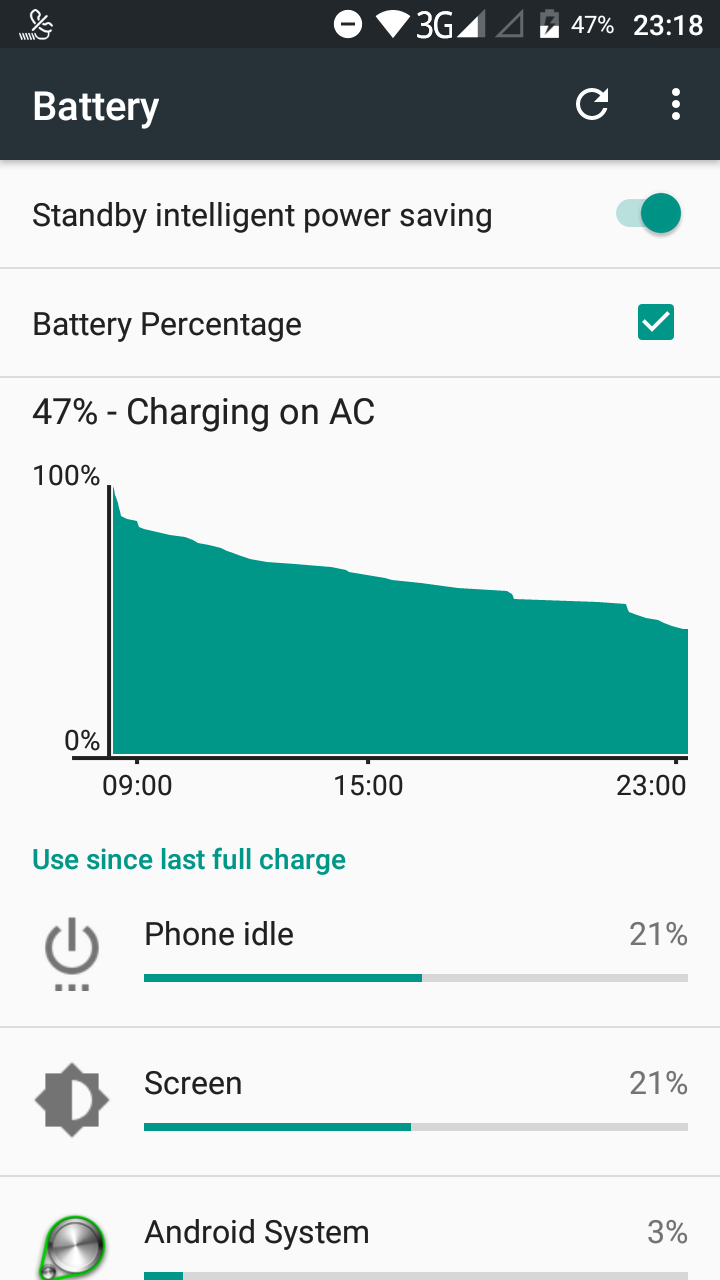
First post.......Ok battery gurus, here's my issue, got a brand new Cubot Note S 3 day ago, batt was 55% on opening, and batt behaved well as i set phone up. I charge my phone to 100 pc overnight every night. So for 3 days now upon awake(c.08.00hrs) i unplug charger, use phone a bit, check twitter, news, e mail etc, and BAM! my battery goes in to freefall! down to 95% in 5 mins, down to 90% in 12 mins down to 80% in 40 mins, nb without constant use. But then interestingly after it hits 80% ish the battery then starts to behave 'normally' and usually by 23.00hrs i have still have approx 40% left! I have more info eg screenshots if needed, also bit concerned re phone idle being a large user ...20% on one day , not that far behind the screen, never seen before on previous(moto g2)??? Im concerned that the battery is a dud and will get worse becasue what appears to be happening in my eyes is that the battery is only ever reaching 80% of life when charged, but the phone gives a 'false' reading of 100% and after I unplug it quickly readjusts itself to real value??....any thoughts/help welcome, cheers
 
Welcome to Android Central! Screenshots of the battery stats would still be helpful, as outlined in post #3.

It might also help to recalibrate the battery sensor software by charging to 100%, then using the phone normally until it shuts down from low battery, then charging back up to 100%.
 
3baee88f8dce2d1df99a72361d14cb05.jpg
 
Were you able to get the other screenshots? I noticed two deleted posts -- not sure if those were unsuccessful attempts at posting the shots.

Another thing to consider is to let the phone continue charging for about an hour after it reads 100%. This so-called "saturation charge" might help with the initial battery usage curve.
 
The high Phone Idle percentage makes me wonder if your cell signal is poor throughout the day. If you tap the battery graph, does it give you a fullscreen graph with a Cell Signal Strength indicator? If not, you could install GSam Battery Monitor to get that information.

The dual-SIM capability on your phone also makes me wonder if for some reason the phone might be searching for signal on the second SIM -- even if you don't have one inserted.
 
but second sim slot is disabled so why would it do that? the full screen battery wass the first screeshot, which has signal on it, yes signal can be poor, but why would that explain why the battery drain just changes dramatically once it goes below 80%, its chalk and cheese its as if the batt was only ever 80% like it was instructed to do that(but phone gives false read), i have heard of such things on laptops, could that be an issue Its not this Intelligent standby mode is it??? i will install Gsam and look again thansk
 
Whoops, sorry -- I forgot to look back in the thread for that screenshot.

Regarding the 2nd SIM slot, yes it's disabled and so it shouldn't be doing that -- but what I'm wondering is if there's some kind of firmware or hardware bug, could the phone inappropriately think it's active and therefore be expending energy looking for a signal? Just a speculation.

You've already done a couple of full charge/discharge cycles to calibrate the battery sensor software, correct?
 
No not quite, not done full discharge yet, I'm going to let her die tonight... Will report back in 2 or 3 days... But I suspect I'll be saying the same thing! The battery behavior may be odd(ie the first 20pc rapid drain) but it's been very consistent, again I'm left with 38% at sleep time which has been same for 3 days now, cheers for input thus far