
Phone says "alarm" just before alarm tone sounds
- Thread starter Flutter
- Start date
You are using an out of date browser. It may not display this or other websites correctly.
You should upgrade or use an alternative browser.
You should upgrade or use an alternative browser.

- Feb 6, 2017
- 99,109
- 15,813
- 113

- Mar 9, 2012
- 169,740
- 11,154
- 113
Welcome to Android Central! Are you saying you hear a voice saying the word "Alarm" before the alarm tone plays?
Check your Accessibility settings and see if anything is turned on there.
Check your Accessibility settings and see if anything is turned on there.

Nothing is turned on under accessibility.Welcome to Android Central! Are you saying you hear a voice saying the word "Alarm" before the alarm tone plays?
Check your Accessibility settings and see if anything is turned on there.
Look in your routines to see if you have activated the voice notification before the sound.How do I stop this? It's annoying.
I don't have any routines set. I went through all the routine area just to be sure, but nothing. I couldn't even find "voice notification" anywhere on the phone.Look in your routines to see if you have activated the voice notification before the sound.
From chatgpt 
How to Disable Alarm Announcements
-Open the Clock app on your phone.
Tap the specific alarm you want to change (you must do this for each alarm individually).
-Tap on "Alarm sound" (located under the alarm name and frequency).
-Tap on "Ringtone" (even if a ringtone is already selected, you must tap the word to enter its sub-menu).
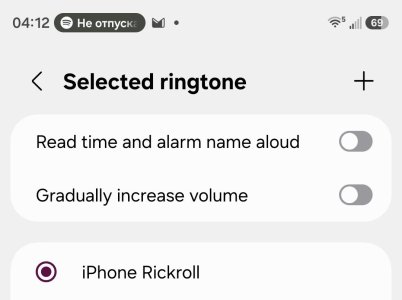
-Toggle OFF "Read time and alarm name aloud" found at the bottom of the ringtone list.
-Save your changes before exiting the alarm.
Or
Check for Bixby Briefing
If you hear a voice reading weather or news updates instead of just the word "alarm," you might have the Bixby Briefing enabled:
-In the Alarm sound menu, ensure Ringtone is selected instead of Bixby alarm.
-If you prefer using Bixby but want it quiet, look for a toggle like "Read time and weather" or "Include news" within the Bixby alarm settings and turn it off.
Other people with the same problem, now its ok with the first solution

How to Disable Alarm Announcements
-Open the Clock app on your phone.
Tap the specific alarm you want to change (you must do this for each alarm individually).
-Tap on "Alarm sound" (located under the alarm name and frequency).
-Tap on "Ringtone" (even if a ringtone is already selected, you must tap the word to enter its sub-menu).
-Toggle OFF "Read time and alarm name aloud" found at the bottom of the ringtone list.
-Save your changes before exiting the alarm.
Or
Check for Bixby Briefing
If you hear a voice reading weather or news updates instead of just the word "alarm," you might have the Bixby Briefing enabled:
-In the Alarm sound menu, ensure Ringtone is selected instead of Bixby alarm.
-If you prefer using Bixby but want it quiet, look for a toggle like "Read time and weather" or "Include news" within the Bixby alarm settings and turn it off.
Other people with the same problem, now its ok with the first solution
I went through all of my alarms and read aloud isn't on. but it still says alarm. I'm about ready to give up at this point. I can't friggin' figure it out.From chatgpt
How to Disable Alarm Announcements
-Open the Clock app on your phone.
Tap the specific alarm you want to change (you must do this for each alarm individually).
-Tap on "Alarm sound" (located under the alarm name and frequency).
-Tap on "Ringtone" (even if a ringtone is already selected, you must tap the word to enter its sub-menu).
-Toggle OFF "Read time and alarm name aloud" found at the bottom of the ringtone list.
-Save your changes before exiting the alarm.
Or
Check for Bixby Briefing
If you hear a voice reading weather or news updates instead of just the word "alarm," you might have the Bixby Briefing enabled:
-In the Alarm sound menu, ensure Ringtone is selected instead of Bixby alarm.
-If you prefer using Bixby but want it quiet, look for a toggle like "Read time and weather" or "Include news" within the Bixby alarm settings and turn it off.
Other people with the same problem, now its ok with the first solution
Attachments

PsychDoc
Well-known member
- May 28, 2011
- 1,544
- 269
- 83
From Perplexity - -
that sounds like Samsung’s Bixby alarm voice feature, which can read the time, weather, and news aloud when the alarm is about to go off �.
How to turn it off
Open Clock > Alarm > tap the alarm > Alarm sound and change it from Bixby alarm to a normal sound �.
If it’s the “upcoming alarm” notification
Samsung and Android also show an upcoming alarm notification in the Clock app, which can be managed from the Clock app’s settings or by editing the alarm itself �.
Also check this
If the announcement happens during a call, Samsung has a separate setting for allow alarm notification sound in call under Phone app call settings �.
If you want, I can walk you through the exact taps on your S26 Ultra to find the setting.
Yes — here’s the quickest way to stop that voice announcement on your Galaxy S26 Ultra.
Turn off Bixby alarm
Open Clock.
Tap Alarm at the bottom.
Tap the alarm that’s speaking before it goes off.
Tap Alarm sound.
If it says Bixby alarm, change it to a regular ringtone or song.
Tap Save. Samsung says Bixby alarm is selected from the alarm’s Alarm sound menu, and that’s where you switch it off �.
Check the upcoming-alarm notice
In Clock, tap the three dots in the top right.
Tap Settings.
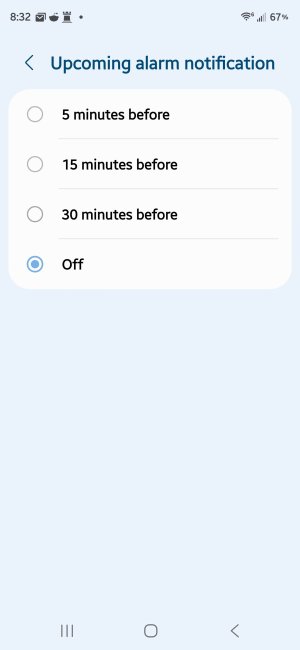
Look for Upcoming alarm notification under the Alarm section.
Turn it off or shorten the warning time if that option is available. Samsung/Android support notes this setting controls advance alarm notifications �.
If it still happens
If the voice only appears when you’re on a call, Samsung has a separate setting for alarm sounds during calls, so that would be the next thing to check �. If you want, I can give you a second-by-second tap path based on what you see on your screen.
that sounds like Samsung’s Bixby alarm voice feature, which can read the time, weather, and news aloud when the alarm is about to go off �.
How to turn it off
Open Clock > Alarm > tap the alarm > Alarm sound and change it from Bixby alarm to a normal sound �.
If it’s the “upcoming alarm” notification
Samsung and Android also show an upcoming alarm notification in the Clock app, which can be managed from the Clock app’s settings or by editing the alarm itself �.
Also check this
If the announcement happens during a call, Samsung has a separate setting for allow alarm notification sound in call under Phone app call settings �.
If you want, I can walk you through the exact taps on your S26 Ultra to find the setting.
Yes — here’s the quickest way to stop that voice announcement on your Galaxy S26 Ultra.
Turn off Bixby alarm
Open Clock.
Tap Alarm at the bottom.
Tap the alarm that’s speaking before it goes off.
Tap Alarm sound.
If it says Bixby alarm, change it to a regular ringtone or song.
Tap Save. Samsung says Bixby alarm is selected from the alarm’s Alarm sound menu, and that’s where you switch it off �.
Check the upcoming-alarm notice
In Clock, tap the three dots in the top right.
Tap Settings.
Look for Upcoming alarm notification under the Alarm section.
Turn it off or shorten the warning time if that option is available. Samsung/Android support notes this setting controls advance alarm notifications �.
If it still happens
If the voice only appears when you’re on a call, Samsung has a separate setting for alarm sounds during calls, so that would be the next thing to check �. If you want, I can give you a second-by-second tap path based on what you see on your screen.
- Feb 6, 2017
- 99,109
- 15,813
- 113
Good suggestionFrom Perplexity - -
that sounds like Samsung’s Bixby alarm voice feature, which can read the time, weather, and news aloud when the alarm is about to go off �.
How to turn it off
Open Clock > Alarm > tap the alarm > Alarm sound and change it from Bixby alarm to a normal sound �.
If it’s the “upcoming alarm” notification
Samsung and Android also show an upcoming alarm notification in the Clock app, which can be managed from the Clock app’s settings or by editing the alarm itself �.
Also check this
If the announcement happens during a call, Samsung has a separate setting for allow alarm notification sound in call under Phone app call settings �.
If you want, I can walk you through the exact taps on your S26 Ultra to find the setting.
Yes — here’s the quickest way to stop that voice announcement on your Galaxy S26 Ultra.
Turn off Bixby alarm
Open Clock.
Tap Alarm at the bottom.
Tap the alarm that’s speaking before it goes off.
Tap Alarm sound.
If it says Bixby alarm, change it to a regular ringtone or song.
Tap Save. Samsung says Bixby alarm is selected from the alarm’s Alarm sound menu, and that’s where you switch it off �.
Check the upcoming-alarm notice
In Clock, tap the three dots in the top right.
Tap Settings.
Look for Upcoming alarm notification under the Alarm section.
Turn it off or shorten the warning time if that option is available. Samsung/Android support notes this setting controls advance alarm notifications �.
If it still happens
If the voice only appears when you’re on a call, Samsung has a separate setting for alarm sounds during calls, so that would be the next thing to check �. If you want, I can give you a second-by-second tap path based on what you see on your screen.
I haven't set up Bixby, could it still do this?From Perplexity - -
that sounds like Samsung’s Bixby alarm voice feature, which can read the time, weather, and news aloud when the alarm is about to go off �.
How to turn it off
Open Clock > Alarm > tap the alarm > Alarm sound and change it from Bixby alarm to a normal sound �.
If it’s the “upcoming alarm” notification
Samsung and Android also show an upcoming alarm notification in the Clock app, which can be managed from the Clock app’s settings or by editing the alarm itself �.
Also check this
If the announcement happens during a call, Samsung has a separate setting for allow alarm notification sound in call under Phone app call settings �.
If you want, I can walk you through the exact taps on your S26 Ultra to find the setting.
Yes — here’s the quickest way to stop that voice announcement on your Galaxy S26 Ultra.
Turn off Bixby alarm
Open Clock.
Tap Alarm at the bottom.
Tap the alarm that’s speaking before it goes off.
Tap Alarm sound.
If it says Bixby alarm, change it to a regular ringtone or song.
Tap Save. Samsung says Bixby alarm is selected from the alarm’s Alarm sound menu, and that’s where you switch it off �.
Check the upcoming-alarm notice
In Clock, tap the three dots in the top right.
Tap Settings.
Look for Upcoming alarm notification under the Alarm section.
Turn it off or shorten the warning time if that option is available. Samsung/Android support notes this setting controls advance alarm notifications �.
If it still happens
If the voice only appears when you’re on a call, Samsung has a separate setting for alarm sounds during calls, so that would be the next thing to check �. If you want, I can give you a second-by-second tap path based on what you see on your screen.
- Feb 6, 2017
- 99,109
- 15,813
- 113
Yes open the alarm app and tap the 3 dots upper right corner, I circled in redI haven't set up Bixby, could it still do this?

Latest posts
-
 Cara atasi buka blokir bank BWS
- Latest: LAYANAN BANK BWS
-
Buka blokir bank BWS tampa ribet
- Latest: LAYANAN BANK BWS
-
CARA MENGATASI MASALAH BUKA BLOKIR BANK BWS
- Latest: LAYANAN BANK BWS
-
-
Trending Posts
-
Cara atasi buka blokir bank BWS
- Started by LAYANAN BANK BWS
- Replies: 0
-
BERIKUT CARA UNTUK BUKA BLOKIR BANK BWS
- Started by LAYANAN BANK BWS
- Replies: 0
-
-

-
Members online
Total: 17,832 (members: 7, guests: 17,825)
Forum statistics

Space.com is part of Future plc, an international media group and leading digital publisher. Visit our corporate site.
© Future Publishing Limited Quay House, The Ambury, Bath BA1 1UA. All rights reserved. England and Wales company registration number 2008885.
 Facebook
 Twitter
 Instagram