question about battery and apps running.

RavenSword

Well-known member
Jan 25, 2013
989
0
0
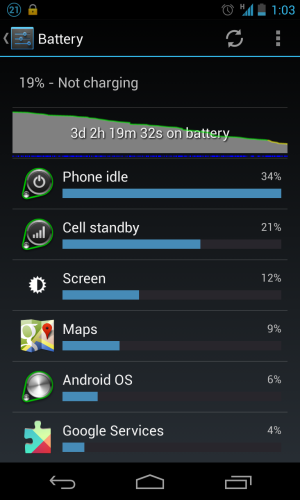
So, in my borderline OCD quest to get the most out of my battery life, I'm trying to figure out why Google maps is always running in the background in my "apps running" tab (even though I never use it) and if that means its consuming some of my battery even if Google maps isn't showing up in my battery management page that it consumed some if my battery?

Is it normal for maps to continue running, even though I have all settings for it off?

If it doesn't show up in my battery page, am I good?

I just want to get the most out of my battery.
 
So, in my borderline OCD quest to get the most out of my battery life, I'm trying to figure out why Google maps is always running in the background in my "apps running" tab (even though I never use it) and if that means its consuming some of my battery even if Google maps isn't showing up in my battery management page that it consumed some if my battery?

Is it normal for maps to continue running, even though I have all settings for it off?

If it doesn't show up in my battery page, am I good?

I just want to get the most out of my battery.
Yes

Yes

How often do you check your phone for emails, twitter etc etc etc? If the answer is "only when I want to check them" rather than "as soon as they arrive", then just shut off all sync on the power control widget. Then just sync your phone when you want to check it. Also if you are not using 3G (or als always on wifi) just switch 3G off and use 2G instead. Lastly, change the screen brightness. Dont go with the Auto function, simply reduce it to 20-30% as that is more than enough for normal use indoors. Outdoor you can increase it to max if you wish. The power control widget can be used for that as well.Battery lasts considerably longer this way.
 
Last edited:
Honestly, don't worry too much about any of that. Android does such a good job of power management now that apps that may be "running" are often just in a suspended state.

Turning off things on the phone will always increase battery life, yes, but unless I'm watching streaming video from somewhere I never have trouble making it through the day with my N4. Turning things off on it would just take a bit away from the experience.
 
The only things I turn off are the stuff I never use, like the syncing of Drive, Currents, Play Magazine, Play Books, etc... You can find that stuff under settings>accounts, then tap your gmail address. Stressing over your battery is going to keep you from using/enjoying the phone. Do anything/everything you want with it. If it gets low on juice, plug it in while in the car or at the office. If those options don't work, get a portable battery pack for $40.
 
I imagine stuff like maps run in the background for features that integrate it all - for instance, Google Now will give you estimated time to drive back home. I assume it needs maps to calculate that.
 
This is my last uptime I used it less because i was using N10 to play poker most of the time.
I still had 1 hr 10 min screen time.

Screenshot_2013-03-13-13-03-40.png
 
Then again, maybe its draining because I'm using it slot. I do a lot of Google music streaming, a fair bit of YouTube, alot of webbrowsing, and alot of just messing around with the phone because its all brand new to me :P
