Quick Flashlight?

Rhyalus

Well-known member
Jun 29, 2014
354
0
16
Hi All,

Anyway to get a flashlight functionality from the lock screen? For example, I have it set so a double press of the power button brings up the camera.

Anyway to do this, maybe with the Bixby button, perhaps?

I can just pull down the top screen to turn on the light, but I still have to hit the power button and then drag down.

Thanks,
R
 
Yup. You need the BxActions app. I used that to set my Bixby button to toggle flashlight on double press when phone is locked.
 
Press the Bixby button and say "flashlight on". Then when you want it off, press the Bixby button and say "flashlight off ".
 
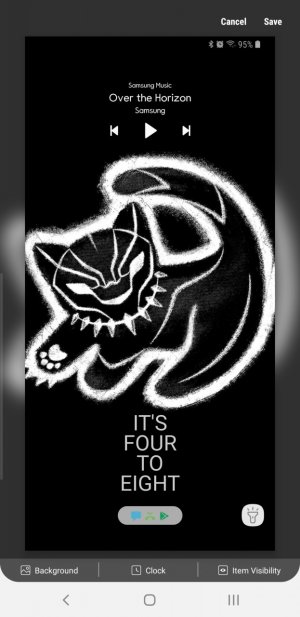
I use LockStar (part of the Good Lock 2018 apps). In there, you can set one of the on-screen application to be the flashlight. I wish I could set the flashlight as one of the apps for the bixby button, but hitting the power button and hitting the flashlight icon on screen is good enough for my needs.Screenshot_20190318-111621_LockStar.jpg
 
Yup. You need the BxActions app. I used that to set my Bixby button to toggle flashlight on double press when phone is locked.

BxActions works great. I have it set to toggle the flashlight on/off using a long-press. Less likely for me to accidentally trigger it and as opposed to trying to map Bixby to do it natively (which only triggers it ON but you can't use the same trigger to turn it OFF).
 
Somehow, I don't think that's the solution the poster is looking for.

Hah, well I actually am a secret agent, so silent activation is critical to my operations.

But seriously, I already paid the 2.99 for Bxactions and settled on the long press flashlight. Hoping I can find some other use for it.

R
 

Trending Posts

Members online

Forum statistics

Threads
959,840
Messages
6,980,341
Members
3,164,312
Latest member
kos123q