
Hello,
I own a TELUS Samsung Galaxy S4, Model number: SGH-I337M, I recently got it unlocked. I upgraded it to Lolypop, so android version is: 5.0.1.
There are 2 issues I am facing.
1. Wifi issue: Every time my router is restarted ( due to poor power supply), it asks me to sign in again. Though it doesn't ask me to provide the log in credentials, I need to choose my wifi and hit connect button every time.
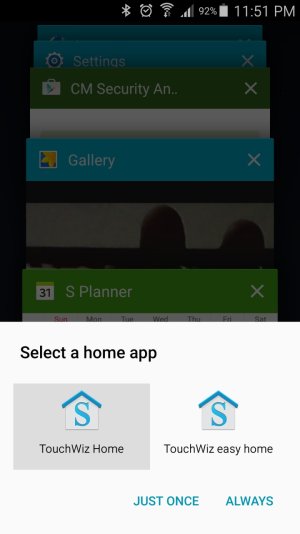
2. TouchWiz Issues: I took the screenshot and attached it here. Every time, I close all the opened apps, by holding the Home button and selecting 'Delete All' option, even the TouchWiz gets cleared from the default apps list and asks me to choose between 'TouchWiz Home' or 'TouchWiz easy home' and set a Home app . Even though I choose 'TouchWiz Home' and set it as 'always' option, it still asks me to set the default launcher every time. And then a 'Clear Defaults' message pops up with content: 'Clear Default app settings by going to Task Manager > Clear default and tapping Clear'
3. In order to avoid #2, I tried enabling an option under - Developer Options -> Do Not keep activities. But it doesn't seem to work. The opened apps, remain in Open state in Task manager even after enabling that option.
After googling around I thought #2 is caused by either 'Google search' or 'Google Music Player' app, so I tried un-installing them, but no improvement. Please help.
I own a TELUS Samsung Galaxy S4, Model number: SGH-I337M, I recently got it unlocked. I upgraded it to Lolypop, so android version is: 5.0.1.
There are 2 issues I am facing.
1. Wifi issue: Every time my router is restarted ( due to poor power supply), it asks me to sign in again. Though it doesn't ask me to provide the log in credentials, I need to choose my wifi and hit connect button every time.
2. TouchWiz Issues: I took the screenshot and attached it here. Every time, I close all the opened apps, by holding the Home button and selecting 'Delete All' option, even the TouchWiz gets cleared from the default apps list and asks me to choose between 'TouchWiz Home' or 'TouchWiz easy home' and set a Home app . Even though I choose 'TouchWiz Home' and set it as 'always' option, it still asks me to set the default launcher every time. And then a 'Clear Defaults' message pops up with content: 'Clear Default app settings by going to Task Manager > Clear default and tapping Clear'
3. In order to avoid #2, I tried enabling an option under - Developer Options -> Do Not keep activities. But it doesn't seem to work. The opened apps, remain in Open state in Task manager even after enabling that option.
After googling around I thought #2 is caused by either 'Google search' or 'Google Music Player' app, so I tried un-installing them, but no improvement. Please help.
 .
.

 Facebook
 Twitter
 Instagram