S7 - Camera failed - Flashlight in use by another application

Bittsen

Member
Jul 28, 2019
8
0
0
A couple months ago my Snapchat app stopped rotating the camera when I tried to place text.
I uninstalled and reinstalled Snapchat and nothing got better.

About a month ago my camera stopped working and I got the "camera failed" message. While diagnosing noticed the flashlight app had a half working icon (light blue) and when I pressed on it it said the flashlight was in use by another app.

I tried everything I've read online about rebooting into safe mode, clearing the cache partition, etc. Nothing worked long term. I could get the camera and flashlight back for a few cycles but then it would stop again.

I did a factory reset and still, nada (although I did install everything from a backup before testing.

I replaced the SD card.

I deleted a few apps and the flashlight started working again.

Today I tried to reinstall Oreo and when using ODIN, I got a fail.

I also tried installing from the SD card, and it also failed.

I've only used ODIN one other time, a long time ago, so I'm not 100% sure I'm doing it right. Same with the upgrading from SD card.

It seems that there are a lot of people on the internet having similar issues.

Any help is appreciated.
 
A couple months ago my Snapchat app stopped rotating the camera when I tried to place text.
I uninstalled and reinstalled Snapchat and nothing got better.

About a month ago my camera stopped working and I got the "camera failed" message. While diagnosing noticed the flashlight app had a half working icon (light blue) and when I pressed on it it said the flashlight was in use by another app.

I tried everything I've read online about rebooting into safe mode, clearing the cache partition, etc. Nothing worked long term. I could get the camera and flashlight back for a few cycles but then it would stop again.

I did a factory reset and still, nada (although I did install everything from a backup before testing.

I replaced the SD card.

I deleted a few apps and the flashlight started working again.

Today I tried to reinstall Oreo and when using ODIN, I got a fail.

I also tried installing from the SD card, and it also failed.

I've only used ODIN one other time, a long time ago, so I'm not 100% sure I'm doing it right. Same with the upgrading from SD card.

It seems that there are a lot of people on the internet having similar issues.

Any help is appreciated.
What version Android your currently on ?
And how did you proceed with trying Odin, which version of Odin ?
 
I have android version 8.0.0 on it now.
Auto update says no new versions available.

For the ODIN update..

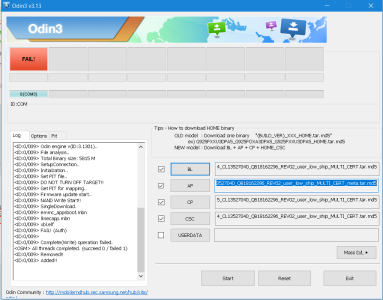
I downloaded a zipfile G930AUCU4CRE4_Oreo zip and extracted the files to reveal:
AP_G930AUCU4CRE4_CL13527040_QB18162296_REV02_user_low_ship_MULTI_CERT_meta.tar.md5
BL_G930AUCU4CRE4_CL13527040_QB18162296_REV02_user_low_ship_MULTI_CERT.tar.md5
CP_G930AUCU4CRE4_CP9711955_CL13527040_QB18162296_REV02_user_low_ship_MULTI_CERT.tar.md5
CSC_ATT_G930AATT4CRE4_CL13527040_QB18162296_REV02_user_low_ship_MULTI_CERT.tar.md5

I booted the phone into the ODIN screen and set it to download
I attached the cable and saw the blue/green icon for the com connection appear.
I loaded the files into ODIN and selected to start.

This is the ODIN results

ODIN.png
 
I have android version 8.0.0 on it now.
Auto update says no new versions available.

For the ODIN update..

I downloaded a zipfile G930AUCU4CRE4_Oreo zip and extracted the files to reveal:
AP_G930AUCU4CRE4_CL13527040_QB18162296_REV02_user_low_ship_MULTI_CERT_meta.tar.md5
BL_G930AUCU4CRE4_CL13527040_QB18162296_REV02_user_low_ship_MULTI_CERT.tar.md5
CP_G930AUCU4CRE4_CP9711955_CL13527040_QB18162296_REV02_user_low_ship_MULTI_CERT.tar.md5
CSC_ATT_G930AATT4CRE4_CL13527040_QB18162296_REV02_user_low_ship_MULTI_CERT.tar.md5

I booted the phone into the ODIN screen and set it to download
I attached the cable and saw the blue/green icon for the com connection appear.
I loaded the files into ODIN and selected to start.

This is the ODIN results

View attachment 306009
You have to try maybe Odin 3.12 for s7 and put your model number and Carrier in sammobile for the latest firmware and download that , then you should be fine
 
I obtained files from xda and used ODIN 3.12.3 and had the same result.
Am I supposed to do anything with Kies?
Possible , can uninstall it see.
But I think maybe more what bootloader your on and one your trying install. Is that file you download the latest for s7?
 
Exact same issue here on my Samsung S7 Edge (Verizon), Andriod 8.0.0 - phone was updated on 7/23/2019, and since that update I get the "Camera Failed" error, and intermittent "Flashlight in use by other app". I have spent hours looking online for a solution and have tried everything except a factory reset - I'm hesitant to do that as most have said it made no difference. Tried the solutions recommended everywhere: clear cache and data from the Camera app; wipe cache partition in recovery mode; disable smart stay; removed SD card; Reset in General Management; boot in safe mode, etc, etc. etc. I'm convinced this is NOT a hardware problem as it literally started doing this after the update and I've read about dozens of other people with same issue. Any help much appreciated!!
 

Latest posts

Trending Posts

Forum statistics

Threads
960,399
Messages
6,982,300
Members
3,164,515
Latest member
Lovelylavis
