My icons are set to the default setting, but I don't like the squarcle shape. I go to settings - display and try to select Icon Frames off but it's greyed out. Any suggestions?
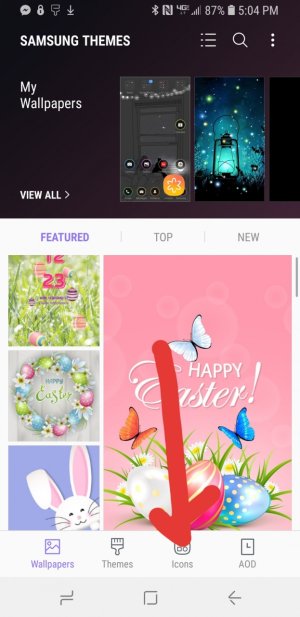
@JessicaTracey mine was doing the same too. It is very easy to fix it. I have galaxy S9+. What you need to do is: click on a blank spot on your homepage...immediately you will see the options at the bottom of screen from LEFT TO RIGHT AS FOLLOWS:
wallpapers, themes, Icons, AOD
Click on the Icons and it will restore it to the format without any FRAMES. The reason this occurred is because the themes or wallpapers changed it.
*Once you click on ICON, only your icons go back to their previous format and whatever wallpaper or theme you have already applied remains the same.
My icons are set to the default setting, but I don't like the squarcle shape. I go to settings - display and try to select Icon Frames off but it's greyed out. Any suggestions?





 Facebook
 Twitter
 Instagram