S9+ stopped receiving data after Pie on 2/5/18

  • Thread starter Thread starter Android Central Question
  • Start date Start date
A

Android Central Question

I have an AT&T S9+ and I updated it 8 days ago (2/5/18) and I have had no data since then. AT&T has supposedly worked on it all week and has not been able to find any network issues and states they can't fix it. Samsung states they can only warranty a hardware issue and this is a software issue. I've restarted in safe mode, reset network settings, done a factory reset, gone through APN settings with AT&T tech support, AT&T replaced SIM card. Does anyone have any idea what I can do? I need my phone for work as a medical provider!

Thanks,
Eric
 
Please Help! S9+ stopped receiving data after software update 8 days ago!

I have an AT&T S9+ and I updated it 8 days ago (2/5/18) and I have had no data since then. AT&T has supposedly worked on it all week and has not been able to find any network issues and states they can't fix it. Samsung states they can only warranty a hardware issue and this is a software issue. I've restarted in safe mode, reset network settings, done a factory reset, gone through APN settings with AT&T tech support, AT&T replaced SIM card. Does anyone have any idea what I can do? I need my phone for work as a medical provider!

Any help appreciated,
Eric
 
Re: Please Help! S9+ stopped receiving data after software update 8 days ago!

I have an AT&T S9+ and I updated it 8 days ago (2/5/18) and I have had no data since then. AT&T has supposedly worked on it all week and has not been able to find any network issues and states they can't fix it. Samsung states they can only warranty a hardware issue and this is a software issue. I've restarted in safe mode, reset network settings, done a factory reset, gone through APN settings with AT&T tech support, AT&T replaced SIM card. Does anyone have any idea what I can do? I need my phone for work as a medical provider!

Any help appreciated,
Eric

Have you reset APN settings?
 
Re: Please Help! S9+ stopped receiving data after software update 8 days ago!

Need translation, what "data?" are you referring to? Text messages, other?

3rd party app you installed likely is not compatible.

A clean install and troubleshooting it carefully.
Also a good idea to have a backup phone, even different make or platform. Maybe even a mid range unit. Or trade in for S10+
 
Re: Please Help! S9+ stopped receiving data after software update 8 days ago!

Yes, they have been set to what tech support told me to change.

Where it says APN 3 dots in right corner will give option to reset to default ?
 
Re: Please Help! S9+ stopped receiving data after software update 8 days ago!

Need translation, what "data?" are you referring to? Text messages, other?

3rd party app you installed likely is not compatible.

A clean install and troubleshooting it carefully.
Also a good idea to have a backup phone, even different make or platform. Maybe even a mid range unit. Or trade in for S10+

He mentioned he went safe mode it still persist, so that eliminates 3rd party apps .
 
Re: Please Help! S9+ stopped receiving data after software update 8 days ago!

Yes, I've reset to default as well. Thanks for the suggestion.
 
Re: Please Help! S9+ stopped receiving data after software update 8 days ago!

Data, like mobile data. I can make calls and regular texts but no internet access therefore unable to use any apps that use internet, like Google maps, when away from wifi.
 
Re: Please Help! S9+ stopped receiving data after software update 8 days ago!

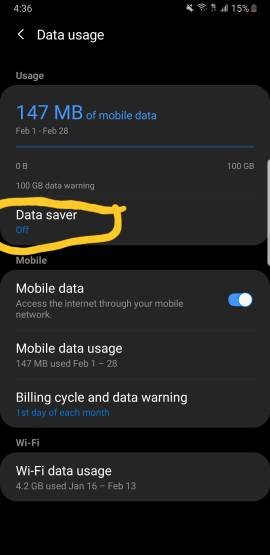
Ok do you have those apps restricted to use on data?


Edit: or do you have data saver on ?

I have background data restriction turned off, under the power saver option.
 
Re: Please Help! S9+ stopped receiving data after software update 8 days ago!

I have background data restriction turned off, under the power saver option.

In connection setting
 

Attachments

  • 1196.jpg
    1196.jpg
    13.3 KB · Views: 48
Welcome to Android Central! That sounds frustrating.:-\ I'd ask to speak to higher-level AT&T customer service reps and ask them for a replacement phone. Make the point that this happened after a system update that they themselves pushed onto the phone. It wouldn't hurt to mention the importance of using your device at work for patient care.

I doubt I'll be of much help if all of those tech support folks struck out, but have you also tried changing the Preferred Network Type (in Settings>Mobile Networks)?
 
UPDATE: Issue has been resolved. FYI, it was an IMEI issue after my update because it's an international phone that I bought in Greece back in October on vacation, because mine was stolen. I tried my SIM in my old iPhone and data wouldn't work (I was under the impression the store had tried changing SIM but had no confirmation of this). So I went back to ATT to get them to try a new SIM. The SIM from a display phone (with data) made 4G come up on the top of my screen, but when getting me a new SIM, data still wouldn't work. Luckily, the guy knew what he was doing, unlike the first guy I worked with the week prior. He ended up getting the IMEI from an S9+ display and keying it in and that resolved my issue. Thanks for all your suggestions!
 

Latest posts

Trending Posts

Members online

Forum statistics

Threads
961,077
Messages
6,984,898
Members
3,164,637
Latest member
mitiku Berihe