S9+ stopped receiving data after Pie on 2/5/18

  • Thread starter Thread starter Android Central Question
  • Start date Start date
A

Android Central Question

I have an AT&T S9+ and I updated it 8 days ago (2/5/18) and I have had no data since then. AT&T has supposedly worked on it all week and has not been able to find any network issues and states they can't fix it. Samsung states they can only warranty a hardware issue and this is a software issue. I've restarted in safe mode, reset network settings, done a factory reset, gone through APN settings with AT&T tech support, AT&T replaced SIM card. Does anyone have any idea what I can do? I need my phone for work as a medical provider!

Thanks,
Eric
 
Please Help! S9+ stopped receiving data after software update 8 days ago!

I have an AT&T S9+ and I updated it 8 days ago (2/5/18) and I have had no data since then. AT&T has supposedly worked on it all week and has not been able to find any network issues and states they can't fix it. Samsung states they can only warranty a hardware issue and this is a software issue. I've restarted in safe mode, reset network settings, done a factory reset, gone through APN settings with AT&T tech support, AT&T replaced SIM card. Does anyone have any idea what I can do? I need my phone for work as a medical provider!

Any help appreciated,
Eric
 
Re: Please Help! S9+ stopped receiving data after software update 8 days ago!

I have an AT&T S9+ and I updated it 8 days ago (2/5/18) and I have had no data since then. AT&T has supposedly worked on it all week and has not been able to find any network issues and states they can't fix it. Samsung states they can only warranty a hardware issue and this is a software issue. I've restarted in safe mode, reset network settings, done a factory reset, gone through APN settings with AT&T tech support, AT&T replaced SIM card. Does anyone have any idea what I can do? I need my phone for work as a medical provider!

Any help appreciated,
Eric

Have you reset APN settings?
 
Re: Please Help! S9+ stopped receiving data after software update 8 days ago!

Need translation, what "data?" are you referring to? Text messages, other?

3rd party app you installed likely is not compatible.

A clean install and troubleshooting it carefully.
Also a good idea to have a backup phone, even different make or platform. Maybe even a mid range unit. Or trade in for S10+
 
Re: Please Help! S9+ stopped receiving data after software update 8 days ago!

Yes, they have been set to what tech support told me to change.

Where it says APN 3 dots in right corner will give option to reset to default ?
 
Re: Please Help! S9+ stopped receiving data after software update 8 days ago!

Need translation, what "data?" are you referring to? Text messages, other?

3rd party app you installed likely is not compatible.

A clean install and troubleshooting it carefully.
Also a good idea to have a backup phone, even different make or platform. Maybe even a mid range unit. Or trade in for S10+

He mentioned he went safe mode it still persist, so that eliminates 3rd party apps .
 
Re: Please Help! S9+ stopped receiving data after software update 8 days ago!

Yes, I've reset to default as well. Thanks for the suggestion.
 
Re: Please Help! S9+ stopped receiving data after software update 8 days ago!

Data, like mobile data. I can make calls and regular texts but no internet access therefore unable to use any apps that use internet, like Google maps, when away from wifi.
 
Re: Please Help! S9+ stopped receiving data after software update 8 days ago!

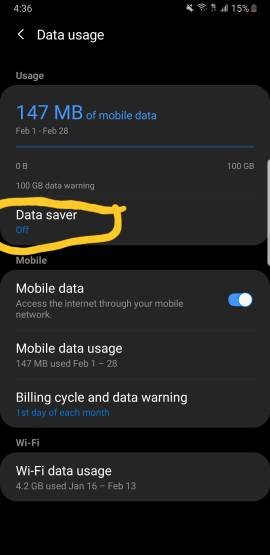
Ok do you have those apps restricted to use on data?


Edit: or do you have data saver on ?

I have background data restriction turned off, under the power saver option.
 
Re: Please Help! S9+ stopped receiving data after software update 8 days ago!

I have background data restriction turned off, under the power saver option.

In connection setting
 

Attachments

  • 1196.jpg
    1196.jpg
    13.3 KB · Views: 48
Welcome to Android Central! That sounds frustrating.:-\ I'd ask to speak to higher-level AT&T customer service reps and ask them for a replacement phone. Make the point that this happened after a system update that they themselves pushed onto the phone. It wouldn't hurt to mention the importance of using your device at work for patient care.

I doubt I'll be of much help if all of those tech support folks struck out, but have you also tried changing the Preferred Network Type (in Settings>Mobile Networks)?
 
UPDATE: Issue has been resolved. FYI, it was an IMEI issue after my update because it's an international phone that I bought in Greece back in October on vacation, because mine was stolen. I tried my SIM in my old iPhone and data wouldn't work (I was under the impression the store had tried changing SIM but had no confirmation of this). So I went back to ATT to get them to try a new SIM. The SIM from a display phone (with data) made 4G come up on the top of my screen, but when getting me a new SIM, data still wouldn't work. Luckily, the guy knew what he was doing, unlike the first guy I worked with the week prior. He ended up getting the IMEI from an S9+ display and keying it in and that resolved my issue. Thanks for all your suggestions!
 

Trending Posts

Forum statistics

Threads
963,050
Messages
6,992,549
Members
3,164,974
Latest member
MisterVoltio