
Greetings Fellow Droids!
I recently upgraded my Samsung Galaxy 23+ to the just-released S26+
I prefer fresh installations and always manually migrate. However, at the 95% migrated mark. I've run into something I've never seen before...
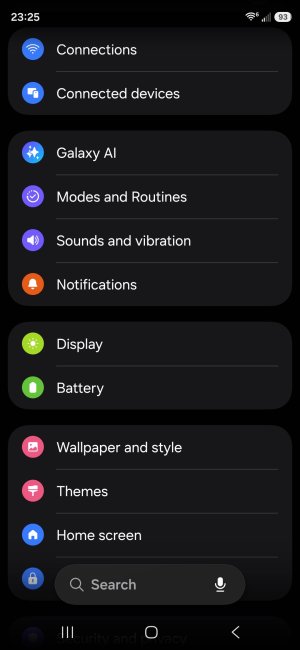
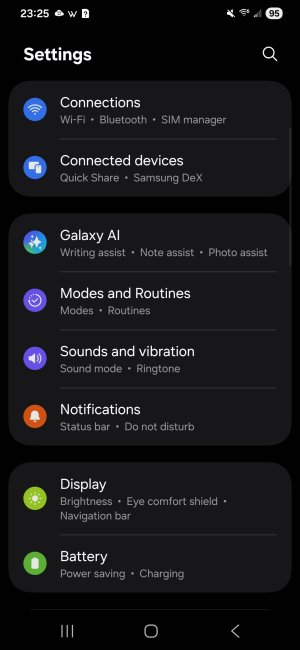
The descriptions under each category within Settings have disappeared. No idea how to bring them back. Seems to be applicable only to the settings app itself and there's no indication of something inadvertently changed system-wide.
I've attached screenshots from the S26+ (android v16, OneUI v8.5) and my S23+ (android v16, OneUI v8) to convey the differences.
Not a huge deal as I generally know where things are, but it bugs me being unable to find what controls this...
All of my searches get redirected to posts where Settings have disappeared altogether. Requesting assistance in the right direction, please!
I recently upgraded my Samsung Galaxy 23+ to the just-released S26+
I prefer fresh installations and always manually migrate. However, at the 95% migrated mark. I've run into something I've never seen before...
The descriptions under each category within Settings have disappeared. No idea how to bring them back. Seems to be applicable only to the settings app itself and there's no indication of something inadvertently changed system-wide.
I've attached screenshots from the S26+ (android v16, OneUI v8.5) and my S23+ (android v16, OneUI v8) to convey the differences.
Not a huge deal as I generally know where things are, but it bugs me being unable to find what controls this...
All of my searches get redirected to posts where Settings have disappeared altogether. Requesting assistance in the right direction, please!



 Facebook
 Twitter
 Instagram