sms locksreen privacy

weesy

Well-known member
Aug 5, 2012
107
0
0
i love that you can no see who texts you and the preview of the message when received on the lockscreen, its great. and i know if you uncheck the box in the settings it'll still show you the notification but it just says messaging/new message ( no sender or anything) is there any way to get the notification to say who the sender is and then new message (where the message text would be) just so that you know who is texting you but have privacy as to what it says! anyone? help!! :confused:
 
I don't think so.

Then again.... The fact that it's kinda hard to disable Samsung's notifications is wack as well...
 
I don't think so.

Then again.... The fact that it's kinda hard to disable Samsung's notifications is wack as well...


even if there isn't a way to do it through the stock app/lockscreen, there has to be another app or widget that can do it...
 
even if there isn't a way to do it through the stock app/lockscreen, there has to be another app or widget that can do it...

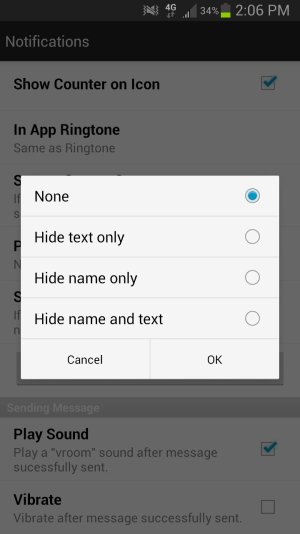
I know ChompSMS can. You go to settings, notifications, and then privacy. You then have these options.

Sent from my Sprint S3 using AC forums.
 

Attachments

  • 1370974054656.jpg
    1370974054656.jpg
    71.3 KB · Views: 6

Trending Posts

Forum statistics

Threads
962,837
Messages
6,992,002
Members
3,164,934
Latest member
BekaH