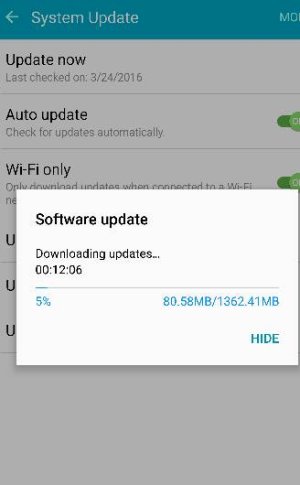
sprint marshmallow

I just DLed and installed it over these last few hours. Seems to be working pretty nicely so far but hopefully I'll get a better picture during the day when I use it like I normally would.

It's pretty finicky in terms of swiping app windows left or right from the multitasking switch screen. I'm not sure why. Sometimes I have to swipe left or right multiple times to get it to go away. Not quite sure why.

Also it looks like you need to put in the password each time you restart even if you have a fingerprint setup. Makes no sense to me since the fingerprint is most secure. Hopefully we can figure out a way to get around that.

Also auto-brightness is a bit weird too. I have it set the way I did (with auto checked but the bar towards the lower end) but right now in my bedroom with the lights off the screen is virtually unreadable with the same settings I always had. I can always brighten the bar of course but I don't want it to be a battery detriment.

Other than that it seems pretty sweet.
 
Noticed it this morning around 9:30 EST. Location is irrelevant.

Posted via the Android Central App
 

Attachments

  • 17336.jpg
    17336.jpg
    16.4 KB · Views: 237
Up and running in Texas too..........After install did a quick restart and updated paly services...running smooth.
 
Got it this morning. I've been lucky, I've been in the first wave for updates for the past few years. This update, so far, had been great. Much smoother scrolling, snappy transitions. Waiting to see about battery life, but I'm liking the new granular settings and Google on Tap. So far, great update!
 
It's embedded, you don't have to do anything, it's automatic. It activates when your phone sits idle, not while it's charging, but when it's unplugged and lying still, like on a table.
 
It's pretty finicky in terms of swiping app windows left or right from the multitasking switch screen. I'm not sure why. Sometimes I have to swipe left or right multiple times to get it to go away. Not quite sure why.

Interesting. I found the same thing on the S7 Edge (T-Mobile). I suspect it's a Samsung Marshmallow issue. It has gotten a lot better over time for what it's worth.

Also, requiring a pin after reboot is actually by design in Marshmallow. It's there in the Nexus 6P too. Not sure why, but it's probably a multi-factor authentication issue.

Posted via the Android Central App
 
But, I mean, I dunno. Fingerprint is pretty damn unique and final. Unless we're all getting our fingers cut off and used to unlock our phones and whatnot.

Not sure I like the new "way" the multitasking cards scroll either. It's a weird difference. Almost like it's one at a time.

I also don't care for the background change on the combined app folders that I have on my home screen. Didn't they used to be sorta clear? Now it's some weird cream off-white thing.

Everything else seems pretty nice. Pretty sweet battery boost. After 12 hours on battery with my normal day use (which isn't super insane, I think I have about 1:05 SOT) I'm still at 61%. By this time of my day I'm usually around 35-40% if I'm lucky. And I haven't re-disabled my Package Disabler Pro list either. Not sure I will if it's like this.

And my "Android System" usage has been pretty much annihilated. Usually it's up around 35-40% and now it's hovering around 12%. Big improvement.
 
I'm very happy with the update, phone is noticeably faster and the little changes to TouchWiz are great.
 
Wish it came with an option to add more then just 4 apps on the doc :(

I know their launchers for that. But none seem to work with the icon paxkage i fot from galaxy store. Guess cant win them all.
 
Last edited:
So far I'm happy with the update. Phone was fast anyway, now even a little more :) Some weird rendering issues on the upper left hand corner. The "Sprint" name sometimes doesn't disappear when a notification comes in and it looks kinda crowded up there. And when it does go away, it takes a while
 
I turned WiFi calling back on. It was all noise when I last tried it a few months ago. Worked good now so I left it on. Overnight the battery drained to 72% (85% is more typical). The battery stats said WiFi calling burned about 60% of the drain to 72% by leaving the phone awake. I guess it makes sense that WiFi calling can't put the phone into a very deep sleep - which makes it a bit less useful if the phone is not on a charger.
 
For some reason now, when I'm in my dialer and press numbers (by letter) to get to who I want to call, it doesn't show me the people that it should "dwindle down" to.

Any ideas?
 
Anyone have any ideas on my last post right above this? It's incredibly irritating.

And so is the "Sprint" on the top left that appears every time I unlock the phone before disappearing. Like, I already know I use Sprint.
 
I just DLed and installed it over these last few hours. Seems to be working pretty nicely so far but hopefully I'll get a better picture during the day when I use it like I normally would.

It's pretty finicky in terms of swiping app windows left or right from the multitasking switch screen. I'm not sure why. Sometimes I have to swipe left or right multiple times to get it to go away. Not quite sure why.

Also it looks like you need to put in the password each time you restart even if you have a fingerprint setup. Makes no sense to me since the fingerprint is most secure. Hopefully we can figure out a way to get around that.

Also auto-brightness is a bit weird too. I have it set the way I did (with auto checked but the bar towards the lower end) but right now in my bedroom with the lights off the screen is virtually unreadable with the same settings I always had. I can always brighten the bar of course but I don't want it to be a battery detriment.

Other than that it seems pretty sweet.
Same issue here. With the task menu.
I can only swipe 1 app away. When i try to do others , nothing happens.
Kind of annoying.