Stopping App Notifications

razza1987

Banned
May 16, 2015
891
0
0
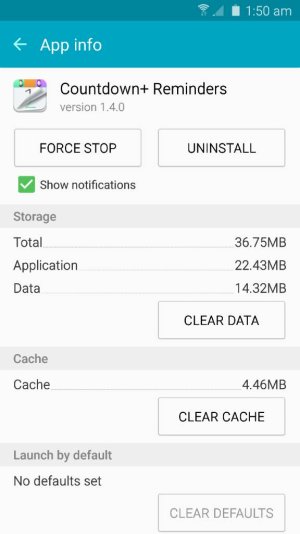
Is there any way to stop app notifications on the phone other than having to bring the app to the home screen then pressing the app to check app info and then selecting stop notifications? This seems so bulky. Like is there another way of getting here?
 

Attachments

  • 1432223557351.jpg
    1432223557351.jpg
    44.1 KB · Views: 8
The way you describe above IS the "long and tedious" way of doing it ... but try this instead:

Just go into your settings, open the Application Manager, then start tapping on the apps you want to stop the notifications on ... when you tap on the app, it pulls up the screen you show above (for that particular app, of course) ... then just uncheck the "show notifications" box.

Yes, it is still a little tedious, but that's the most efficient way I know of to do it. Just be sure to not only check the "downloaded" apps, but page-over to the "running apps", and/or "all" apps to make sure you don't miss any of them that you want to turn off.
 
The way you describe above IS the "long and tedious" way of doing it ... but try this instead:

Just go into your settings, open the Application Manager, then start tapping on the apps you want to stop the notifications on ... when you tap on the app, it pulls up the screen you show above (for that particular app, of course) ... then just uncheck the "show notifications" box.

Yes, it is still a little tedious, but that's the most efficient way I know of to do it. Just be sure to not only check the "downloaded" apps, but page-over to the "running apps", and/or "all" apps to make sure you don't miss any of them that you want to turn off.

Thank you so much for responding. I didn't realise you needed to tap the apps in that section to bring up this screen. That is a much more efficient way of doing something lol. I'm missing app notifications being under the notification settings like they are on my six plus xd