Do Not Disturb still letting notifications through since update

Sarah83

Member
Nov 5, 2025
16
3
3
HI there,
So I had the push notification to do a software update recently and since then it seems my DND is no longer functioning correctly. I have it set to only allow Whatsapp notifications but for some reason all other notifications are still appearing.
Can anyone advise on what I need to change?
Thanks :)
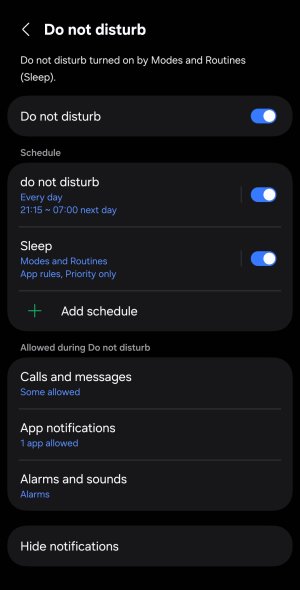
Screenshot_20260124_220430_Settings.jpg
 
Just to be clear -- are these notifications occurring outside of the current DND schedule? Right now, it looks like your DND is scheduled for 9:15 PM to 7 AM.
 
HI there,
So I had the push notification to do a software update recently and since then it seems my DND is no longer functioning correctly. I have it set to only allow Whatsapp notifications but for some reason all other notifications are still appearing.
Can anyone advise on what I need to change?
Thanks :)...
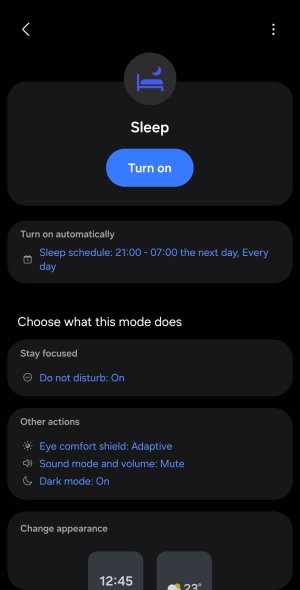
The settings you have available for Do Not Disturb look slightly different than mine, incorporating integration of Do Not Disturb for if controlled by Sleep Mode from Modes and Routines. Have you separately checked the settings of Sleep Mode under Modes and Routines? Previously, I abandoned use of the built in Sleep Mode and basically had to create my own custom Bedside Mode instead, because the built in Sleep mode was doing stuff that it's settings weren't giving me the ability to fully control. It's almost a shot in the dark that potentially there are conflicting settings within your Sleep Mode, but I suggest it's worth a look and see and maybe even play around with it for some trial and error. Until I really played around with modes and routines a lot in terms of how Modes can have control over Do Not Disturb and also things like Lock Screen, for me it was confusing and almost like two different places where settings could be set and potential for apparent conflicts and contradictions.
 
Last edited:
  • Like
Reactions: Sarah83
HI there,
So I had the push notification to do a software update recently and since then it seems my DND is no longer functioning correctly. I have it set to only allow Whatsapp notifications but for some reason all other notifications are still appearing.
Can anyone advise on what I need to change?
Thanks :)

View attachment 373102
Check under hide notification if any of these are toggle on?
e003d3c1743b1ecd90c9c8e62aed5f15.jpg
 
  • Like
Reactions: Sarah83
Just to be clear -- are these notifications occurring outside of the current DND schedule? Right now, it looks like your DND is scheduled for 9:15 PM to 7 AM.
Hi, the notifications are happening all the time, including during the DND schedule.
 
The settings you have available for Do Not Disturb look slightly different than mine, incorporating integration of Do Not Disturb for if controlled by Sleep Mode from Modes and Routines. Have you separately checked the settings of Sleep Mode under Modes and Routines? Previously, I abandoned use of the built in Sleep Mode and basically had to create my own custom Bedside Mode instead, because the built in Sleep mode was doing stuff that it's settings weren't giving me the ability to fully control. It's almost a shot in the dark that potentially there are conflicting settings within your Sleep Mode, but I suggest it's worth a look and see and maybe even play around with it for some trial and error. Until I really played around with modes and routines a lot in terms of how Modes can have control over Do Not Disturb and also things like Lock Screen, for me it was confusing and almost like two different places where settings could be set and potential for apparent conflicts and contradictions.
This makes sense. The fact that Sleep activates DND confuses me as I thought they were the same essentially. So the Sleep routine is set to turn on DND. Should I just turn off the Sleep routine and use the DND setting separately?

34858.jpg
 
This makes sense. The fact that Sleep activates DND confuses me as I thought they were the same essentially. So the Sleep routine is set to turn on DND. Should I just turn off the Sleep routine and use the DND setting separately?...
I think it's worth a try, to see if it works differently when you do something like that. Or, eidt your Sleep Mode settings so when Sleep Mode gets turned on it leaves Do Not Disturb alone and does not use such at all. Or, also closely review what your Sleep Mode settings indicate for how it temporarily adjusts the Do Not Disturb settings, to try to understand if those are the ones that are overruling the other Do Not Disturb settings.
 
Last edited:
  • Like
Reactions: Sarah83
I think it's worth a try, to see if it works differently when you do something like that. Or, eidt your Sleep Mode settings so when Sleep Mode gets turned on it leaves Do Not Disturb alone and does not use such at all. Or, also closely review what your Sleep Mode settings indicate for how it temporarily adjusts the Do Not Disturb settings, to try to understand if those are the ones that are overruling the other Do Not Disturb settings.
Thank you. Turned off sleep mode and only DND is on. But have received notifications from 2 different apps not on my allowed list at around 11pm :/ Odd as this is going directly against my DND settings..
Will try your other suggestions next.
 
Hi, I've checked this and all are set like yours. If I toggle these to hide the notifications, it also does it for the one app I don't want to hide during DND.. Does that make sense?
Yes
So since an update changed this go into recovery clear cache and reboot and delete the current schedule and enter it again see if that helps
 
Apologies, how do I do this please?
So go in DND first and reset the schedule then power off your device before it restart hold power/volume up together untill recovery mode shows and in that menu clear cache and select reboot.

In recovery to choose selections use the volume key and to enter what you select the power button.
 
  • Like
Reactions: Sarah83
So go in DND first and reset the schedule then power off your device before it restart hold power/volume up together untill recovery mode shows and in that menu clear cache and select reboot.

In recovery to choose selections use the volume key and to enter what you select the power button.
No matter how many times I try I can't get it to start in recovery mode! Will get my husband to have a look and see if he can make it work!

I had a push notification for another software update yesterday, I did that hoping it'd make a difference but still DND is allowing all apps to send me notifications.
 
  • Like
Reactions: mustang7757
No matter how many times I try I can't get it to start in recovery mode! Will get my husband to have a look and see if he can make it work!

I had a push notification for another software update yesterday, I did that hoping it'd make a difference but still DND is allowing all apps to send me notifications.
Yeah can be tricky to get into recovery if not done at the correct sequence