Strange 'Low Power' Application

  • Thread starter Thread starter AC Question
  • Start date Start date
A

AC Question

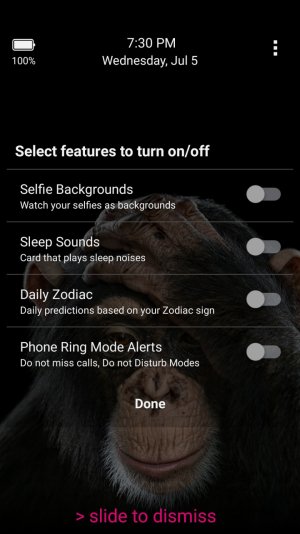
My Samsung S4 started showing a strange power alert recently. The app alerts me that my device has gone below 35% power and suggests that I turn off my wireless. Strangely it keeps the screen lit up (sometimes for hours) until the phone dies or the user 'cancels' the alert. I can dismiss the alert then it takes me to a strange settings page showing on/off sliders for 'Selfie Backgrounds' 'Sleep Sounds' 'Daily Zodiac' and 'Phone Ring Mode Alerts'

I haven't downloaded anything new on my phone for at least a month and I'm unable to identify anything running in the background. The screen shows no identification for the program.

Has anyone else had this issue?
 
Good point, I haven't tried that yet. I'll report back on my findings. In the meantime here's a screenshot of the offending program/virus/widget?

Screenshot_2017-07-05-19-30-24.jpg
 
Same annoying popup here on a Samsung Galaxy Note 3. Cannot find any other comments in the net than this.
Have you already found a solution?
 
This is driving me nuts! I could reset my phone, but I rather would like to know what is this app? How did it install itself here? Can anybody help?

Avast found nothing.
Malwarebytes found nothing.
It's not listed in currently running apps on ShutApp.
It's not listed in Accessibility apps.

There is a guy in Notifications that is suspect, GlanceViewMk... I'll disable it to see what happens.
 
Safe mode did NOT stop the application from running. There have been threads pointing the finger at Peel Remote so I disabled that to see if there's any improvement.

The most hateful part of this is the fact that the notification lights up on the screen and won't go back to sleep unless the user clears the notification. 35% battery life turns to 0% pretty fast when that happens.
 
I disabled Peel Remote and also went into Settings> Sound & Notifications > Notification Access and unchecked something called "GlanceViewMk". So far the strange (and very annoying) lock screen has not returned. I can't tell you which of these moves is preventing the program to run but this is better. Truthfully I'd like to know that it's fully removed... not just disabled.
 
I also disabled Peel Remote yesterday. Since rhen the mysterious notification did not appear anymore.
Not really a solution but at least a workaround. For sure this is a disturbing behavior of an app.
 

Trending Posts

Members online

Forum statistics

Threads
962,827
Messages
6,991,949
Members
3,164,930
Latest member
noroldie