Switchr and Pie Controls

sddabrow

Well-known member
Sep 21, 2012
159
0
0
Hey guys,

Still consider myself new to the Android world. Have any if you with the note 3 tried out pie controls or Switchr?

Thought both of these could be useful for one handed usage but thought I would ask the community their thoughts!

Sent from my SAMSUNG-SM-N900A using AC Forums mobile app
 
Hey guys,

Still consider myself new to the Android world. Have any if you with the note 3 tried out pie controls or Switchr?

Thought both of these could be useful for one handed usage but thought I would ask the community their thoughts!

Sent from my SAMSUNG-SM-N900A using AC Forums mobile app
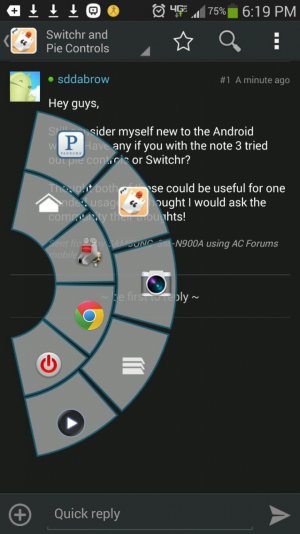
I use pie control, and it works great.

Sent from my Verizon Samsung Galaxy Note 3 via Tapatalk Pro
 

Attachments

  • uploadfromtaptalk1383704409308.jpg
    uploadfromtaptalk1383704409308.jpg
    181.6 KB · Views: 20
If it helps any, one handed operation settings/options are already built into the phone.

Palm Treo line > Blackberry line > Samsung Galaxy S line > NOW - the Samsung Galaxy Note 3 😊
 
I use pie control, and it works great.

Sent from my Verizon Samsung Galaxy Note 3 via Tapatalk Pro

Can you place a 'menu' shortcut on pie controls? Seems to be the only thing I can't really reach with one hand.

Also thanks to the above poster.. Yes I use the one handed mode frequently for simple things, just thought there might be a better way using an app like these.

I also need to learn about triggr... Suposably that app is super efficient too.

Just looking for ways to make my phone more productive :-)

Sent from my SAMSUNG-SM-N900A using AC Forums mobile app
 
Can you place a 'menu' shortcut on pie controls? Seems to be the only thing I can't really reach with one hand.

Also thanks to the above poster.. Yes I use the one handed mode frequently for simple things, just thought there might be a better way using an app like these.

I also need to learn about triggr... Suposably that app is super efficient too.

Just looking for ways to make my phone more productive :-)

Sent from my SAMSUNG-SM-N900A using AC Forums mobile app

Yes, you can, but requires root


Sent from my Verizon Samsung Galaxy Note 3 via Tapatalk Pro
 
If it helps any, one handed operation settings/options are already built into the phone.

Palm Treo line > Blackberry line > Samsung Galaxy S line > NOW - the Samsung Galaxy Note 3 😊

But I don't like that the texts get smaller. Also, it doesn't hold when you turn the screen off. You have to enable it again. Personally I use the flygrip and pie control and I find it preferable over one hand mode

Sent from my Verizon Samsung Galaxy Note 3 via Tapatalk Pro
 
Just installed it and is pretty neat. Seems like am effective way to get to apps fast.

Will play with it for a week or so and will let you know my feedback.

Sent from my SAMSUNG-SM-N900A using AC Forums mobile app
 

Trending Posts

Members online

Forum statistics

Threads
959,846
Messages
6,980,364
Members
3,164,315
Latest member
mariealyiah17
