Text messages randomly disappearing

A new phone, that's extreme, but I understand.

While we're struggling to help you solve the cause behind the disappearances perhaps another course of action can help take the sting out. Being that these messages are important perhaps the next action should be capture. Have you considered using an app to backup your messages? Apps like MyBackUp Pro, allow scheduling of backups, including SMS and MMS. There are apps just for SMS and MMS backup too. By backing up the messages, on a regular schedule, every night, everyday at noon, both, or whatever you hopefully would be able to capture these messages before an event so even if they do go missing there is a record or backup of them.

You mentioned deleting apps, to try and head this off, are all of your apps from the Play Store or reputable places like that? No random online app store, side loaded APKs, or anything like that correct? I'm still struggling to conceive of how another app could reach across and affect your messaging app but something is happening.
Yes, I have SMS Backup on my phone but unfortunately there is no regularity to the apps deleting. It could be the middle of the day or night..

Yes, all of my apps have been from either the Play Store or the Galaxy Store.
 
Are you saying that your backup app is not capturing these messages?

Are you doing any off device messaging? Both Samsung Messages and Google Messages can be sent and viewed from a PC or laptop. Have you tried this with either of them before or since this issue?

I asked that question because when I asked Google this question, will removing an SMS from your desktop extension for Google Messages delete the message on your device, I got this response.

No, deleting an SMS from your desktop extension for Google Messages will not delete it on your device. Once a message is sent and received, it's stored separately on each device. Deleting from your desktop only removes it from your desktop view; the message will still be present on your phone. Google Help notes that deleting a message from your own device only removes it from your own device. Another Reddit post confirms that deleting from the desktop extension will not remove the message from your phone. [1, 1, 2, 2, 3, 3, 4]

Initially I thought, hey what if they were being removed from the device because of being removed from the extension, but when I got this response I thought, hey maybe this is could work as a better backup. Since the messages can disappear at any time I understand how a scheduled backup might not be enough. So what if there were 2 copies of the message in two different locations, surely one would survive. Especially, if the two devices are in a sense independent of one another.

Creating a second message brought to mind Tasker. I don't know the extent of Google Assistant Routines or Bixby Routines in matters like this, they are free though so it may be worth looking into, but with an app like Tasker it is possible to perform these actions, in near real time. This eliminates the possibility of missing the message, because it disappeared before the scheduled backup. Tasker is an automation app that can preforms actions based on logic statements, like IF, AND, OR and THEN. Both of the Routine apps use logic statements but simplify these statements to make them user friendly. In their simplicity their functionality is affected. Where Tasker has a vastly larger capability at the cost of a learning curve and a bit more complication. But if this means dollars in your pocket it might be worth it to learn. Anyway, with Tasker you can send the message to yourself, or anyone, almost as soon as you get it or you can simply capture the text of the message and save it as a note. I don't want to get overly involved in describing Taasker but it is possible to single out numbers to save, or if no specific number it can be limited to a time of day, business hours for instance, or several other limiting factors that wouldn't cause every single message to be handled however. So it isn't an all or nothing thing, where you'll end up with hundreds of needlessly saved messages.
 
Last edited:
I wonder if Google Voice could work. With Google Voice (VC) it is an on device alternative to Google Messages or Samsung Messages. You can get GV with an alternative number or using your primary number. Since you say this at least partially business based, GV gives users a second number that functions just like one's primary number. Accepting calls, texts, and voicemail. If by some chance it is your service that is causing this issue GV can provide an alternative service, which may not be affected by whatever is behind the issue with you're primary service.

Just trying to figure out if not a solution, an alternative that works and helps you retain your messages.
 
I wonder if Google Voice could work. With Google Voice (VC) it is an on device alternative to Google Messages or Samsung Messages. You can get GV with an alternative number or using your primary number. Since you say this at least partially business based, GV gives users a second number that functions just like one's primary number. Accepting calls, texts, and voicemail. If by some chance it is your service that is causing this issue GV can provide an alternative service, which may not be affected by whatever is behind the issue with you're primary service.

Just trying to figure out if not a solution, an alternative that works and helps you retain your messages.
Unfortunately, I have had my business number for way to long to use GV as an option to this.
 
Are you saying that your backup app is not capturing these messages?

Are you doing any off device messaging? Both Samsung Messages and Google Messages can be sent and viewed from a PC or laptop. Have you tried this with either of them before or since this issue?

I asked that question because when I asked Google this question, will removing an SMS from your desktop extension for Google Messages delete the message on your device, I got this response.

No, deleting an SMS from your desktop extension for Google Messages will not delete it on your device. Once a message is sent and received, it's stored separately on each device. Deleting from your desktop only removes it from your desktop view; the message will still be present on your phone. Google Help notes that deleting a message from your own device only removes it from your own device. Another Reddit post confirms that deleting from the desktop extension will not remove the message from your phone. [1, 1, 2, 2, 3, 3, 4]

Initially I thought, hey what if they were being removed from the device because of being removed from the extension, but when I got this response I thought, hey maybe this is could work as a better backup. Since the messages can disappear at any time I understand how a scheduled backup might not be enough. So what if there were 2 copies of the message in two different locations, surely one would survive. Especially, if the two devices are in a sense independent of one another.

Creating a second message brought to mind Tasker. I don't know the extent of Google Assistant Routines or Bixby Routines in matters like this, they are free though so it may be worth looking into, but with an app like Tasker it is possible to perform these actions, in near real time. This eliminates the possibility of missing the message, because it disappeared before the scheduled backup. Tasker is an automation app that can preforms actions based on logic statements, like IF, AND, OR and THEN. Both of the Routine apps use logic statements but simplify these statements to make them user friendly. In their simplicity their functionality is affected. Where Tasker has a vastly larger capability at the cost of a learning curve and a bit more complication. But if this means dollars in your pocket it might be worth it to learn. Anyway, with Tasker you can send the message to yourself, or anyone, almost as soon as you get it or you can simply capture the text of the message and save it as a note. I don't want to get overly involved in describing Taasker but it is possible to single out numbers to save, or if no specific number it can be limited to a time of day, business hours for instance, or several other limiting factors that wouldn't cause every single message to be handled however. So it isn't an all or nothing thing, where you'll end up with hundreds of needlessly saved messages.
I had not been using my desktop for any of my texting.
 
I am at a loss. This almost stops for a bit and then all of the sudden messages will start deleting again. I am not sure where to turn at this point.

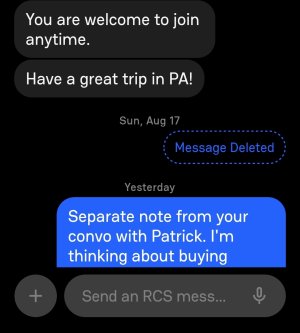
Here's an example from the Beeper app that shows when a Google message is deleted. One time the message is there, and then i go look for it again and it is no where to be found and this is the only trace of it. On the Google app nothing appears...so you could think you just lost your mind...and that you never got a text.
Screenshot_20250908_115806_Beeper.jpg
 
This is happening more frequently again....then it will slow down. This is so frustrating. I am at wits end, The new phone is only 7 months old and I am beside myself as to what else to try.
 
This is a bit drastic, but for now, you could temporarily turn off RCS chat features. The ability for a message to be deleted for everyone in a thread is an RCS feature, and shouldn't be possible with plain SMS, so that should at least prevent this from happening.
 
This is a bit drastic, but for now, you could temporarily turn off RCS chat features. The ability for a message to be deleted for everyone in a thread is an RCS feature, and shouldn't be possible with plain SMS, so that should at least prevent this from happening.
Unfortunately, the messages are only deleting on my devices and they remain on the other parties thread. So I don't think it would solve anything but I am willing to try any suggestions at this point.
 
I think it's still worth trying, since the feature is only supposed to be available with RCS on.

Remind me, have you already tried Safe Mode? I realize this can be unfeasible if the problem is only occurring intermittently, but if it seems to be happening more frequently, it may be worth trying.
 
  • Like
Reactions: Laura Knotek
After seeing your screenshots it reminded me of Telegram where if you delete a message on your end you have the option to delete them on the receiver's end as well. So I asked Google if it were possible to delete messages remotely and this turned up in the search.
  1. Google Messages is now rolling out "Delete for everyone," a feature that lets you delete a sent message from all recipients' devices.
  2. Google started working on the feature back in February, and rolled it out slowly for beta testers in May.
  3. The feature won't work with users who are running an older version of Google Messages, so be careful.
Read more here.
 
  • Like
Reactions: Laura Knotek
I'll move this to our s23 Forum

Is this a work group chat ? Individual messages are no issues?
 
I'll move this to our s23 Forum

Is this a work group chat ? Individual messages are no issues?
They are random individual messages to known people like my husband and some of my clients.

Additionally, this happened on my S22 Ultra as well...so switching phones didn't work. Nor did switching providers.
 
After seeing your screenshots it reminded me of Telegram where if you delete a message on your end you have the option to delete them on the receiver's end as well. So I asked Google if it were possible to delete messages remotely and this turned up in the search.
  1. Google Messages is now rolling out "Delete for everyone," a feature that lets you delete a sent message from all recipients' devices.
  2. Google started working on the feature back in February, and rolled it out slowly for beta testers in May.
  3. The feature won't work with users who are running an older version of Google Messages, so be careful.
Read more here.
That was a screenshot of an app I used to detect when I am missing a message. Primary message app is Google. The deleted messages sometimes are mine an sometimes are the recipient and I know that no one has deleted either message.
 
If you are having issues that follow you even after a fresh start such as a new device the issue could be a bad app. You have something on your phone that you carried from your last device to this one that may be causing this issue, if the issues from your last device and this device both present the same as you are describing now.

A lot of times when users upgrade or switch devices they opt for the automatic switch that moves all apps without question. Really this is the best time to re-evaluate what we're installing and make some changes. My experience here at AC has shown multiple times that if you have an issue that follows you from one device to another, comes back after restarts and cache clears, and happens randomly it is often a bad app. I say "bad", the app may not be bad as in terrible or broken but bad in that it interferes with another app or its function. This can sometimes be on purpose, in which case it truly is a bad app. Finding this requires a different approach but first more questions.

Are all of your apps from the Play Store, Samsung's Galaxy Store, or Amazon App Store?

Do you have any other messaging apps? Obviously your phone will only allow you to have one SMS app active at a time but there are other messaging and messenger apps?

Are you using Dual Messenger on your device? This comes preinstalled on Samsung devices and allows you have multiple messaging service accounts on one device.

Are you using any saver apps? Memory saver, Data saver?

Are you using antivirus or antimalware apps on this device? These types of apps along with the saver type apps I asked about above can cause issues because they typically are always running in the background, stopping or flagging processes that are benign, and usually causing some issue and solving few.

A lot of times with bad apps you can take permissions away and then wait to see which app was last to request that permission before the issue returned, but I cannot think of a permission that could be related to this issue. The next thing I would recommend would be to identify the apps that pose the most risk to the situation. In this case anything that required "other sources" to be enabled for installation, and other messaging apps. Uninstall or disable anything installed needing the "other sources" permission, disable or uninstall any anti or saver apps, and test this condition to see if the problem reoccurs.
 
I would also talk to your carrier because it's happening on multiple message apps and sometimes your device or recipient sounds like server side with carrier.

Are these links and attachments that get deleted?
 

Trending Posts

Members online

Forum statistics

Threads
960,750
Messages
6,983,568
Members
3,164,563
Latest member
oliver11