S STILLMIGHTY Member Jul 10, 2013 10 0 0 Jul 10, 2013 #1 hi, i have 4.1 jb on my alcatel s pop how can i disable touch sounds?? i don't have sound in the settings
hi, i have 4.1 jb on my alcatel s pop how can i disable touch sounds?? i don't have sound in the settings
Sizzers Well-known member Feb 19, 2013 774 162 43 Jul 10, 2013 #3 Do you mean touch sounds from your keyboard? Go in to Settings then Language & Input, then select the cog symbol by your keyboard and you can turn them off in there.
Do you mean touch sounds from your keyboard? Go in to Settings then Language & Input, then select the cog symbol by your keyboard and you can turn them off in there.
S STILLMIGHTY Member Jul 10, 2013 10 0 0 Jul 10, 2013 #4 Sizzers said: Do you mean touch sounds from your keyboard? Go in to Settings then Language & Input, then select the cog symbol by your keyboard and you can turn them off in there. Click to expand... when i'm typing i don't get sounds but for example when i click on settings or other app i get "click" sound and the most od time i touch the screen i get that sound and that is annoying want to remove that
Sizzers said: Do you mean touch sounds from your keyboard? Go in to Settings then Language & Input, then select the cog symbol by your keyboard and you can turn them off in there. Click to expand... when i'm typing i don't get sounds but for example when i click on settings or other app i get "click" sound and the most od time i touch the screen i get that sound and that is annoying want to remove that
Sizzers Well-known member Feb 19, 2013 774 162 43 Jul 10, 2013 #5 Go into Settings>Sound, then untick Touch Sounds in there.
S STILLMIGHTY Member Jul 10, 2013 10 0 0 Jul 10, 2013 #6 Sizzers said: Go into Settings>Sound, then untick Touch Sounds in there. Click to expand... there is no sound option in the settings idk why
Sizzers said: Go into Settings>Sound, then untick Touch Sounds in there. Click to expand... there is no sound option in the settings idk why
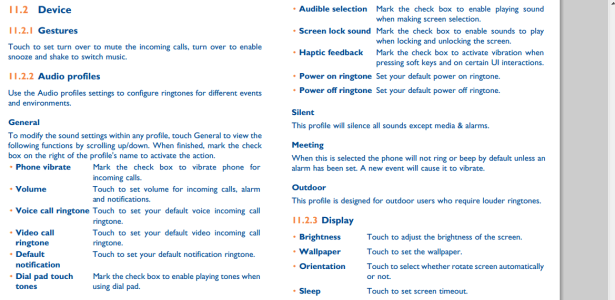
Sizzers Well-known member Feb 19, 2013 774 162 43 Jul 10, 2013 #8 I've just downloaded the manual. You should find the settings you need under "Audio Profiles".
S STILLMIGHTY Member Jul 10, 2013 10 0 0 Jul 11, 2013 #9 Sizzers said: I've just downloaded the manual. You should find the settings you need under "Audio Profiles". Click to expand... when i open Audio Profiles there are only general,silent,meeting,outdoor
Sizzers said: I've just downloaded the manual. You should find the settings you need under "Audio Profiles". Click to expand... when i open Audio Profiles there are only general,silent,meeting,outdoor
Sizzers Well-known member Feb 19, 2013 774 162 43 Jul 11, 2013 #10 This is taken from the manual for the Alcatel onetouch S Pop (do you not have the manual?) Logic would suggest that "Audible Selection" in "General" would be the appropriate option. Attachments Alcatel.PNG 172.7 KB · Views: 0
This is taken from the manual for the Alcatel onetouch S Pop (do you not have the manual?) Logic would suggest that "Audible Selection" in "General" would be the appropriate option.
S STILLMIGHTY Member Jul 10, 2013 10 0 0 Jul 11, 2013 #11 Sizzers said: This is taken from the manual for the Alcatel onetouch S Pop (do you not have the manual?) Logic would suggest that "Audible Selection" in "General" would be the appropriate option. Click to expand... this helped me ty very much
Sizzers said: This is taken from the manual for the Alcatel onetouch S Pop (do you not have the manual?) Logic would suggest that "Audible Selection" in "General" would be the appropriate option. Click to expand... this helped me ty very much





 Facebook
 Twitter
 Instagram