
A
AC Question
Transferring apps from internal storage to SD Card
Ok I don't get this at all. I just recently purchased a brand new SD card but I have absolutely no idea how to transfer all of my stuff on to it. I've searched the internet and can't figure it out.
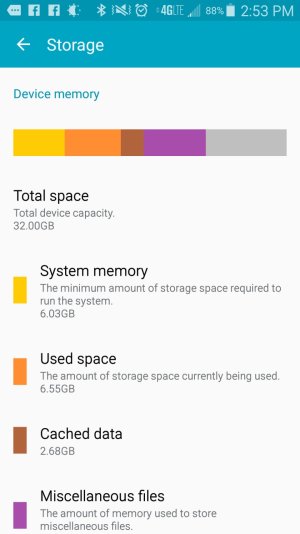
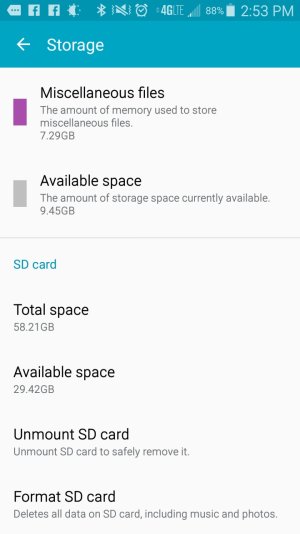
My internal storage holds almost nothing and slows down my phone so I want everything on my phone (mostly apps) to move from the internal storage to the SD Card. The problem is that its not letting me. I have gone to settings and went to specific apps and attempted to move them to the SD card but the SD Card option does not show up. I don't get it.
Ive also gone to the application manager and it shows the SD card storage but no internal storage so I don't know. I was hoping I could transfer files from there but apparently not.
Im just at a loss here. It seems my phone isn't even allowing me to transfer anything to my SD card. It also installs everything that I download to internal storage. Ive looked and can't figure out how to make the default download to my SD Card.
Would really appreciate if somebody could help me. I have no idea why its this difficult.
Ok I don't get this at all. I just recently purchased a brand new SD card but I have absolutely no idea how to transfer all of my stuff on to it. I've searched the internet and can't figure it out.
My internal storage holds almost nothing and slows down my phone so I want everything on my phone (mostly apps) to move from the internal storage to the SD Card. The problem is that its not letting me. I have gone to settings and went to specific apps and attempted to move them to the SD card but the SD Card option does not show up. I don't get it.
Ive also gone to the application manager and it shows the SD card storage but no internal storage so I don't know. I was hoping I could transfer files from there but apparently not.
Im just at a loss here. It seems my phone isn't even allowing me to transfer anything to my SD card. It also installs everything that I download to internal storage. Ive looked and can't figure out how to make the default download to my SD Card.
Would really appreciate if somebody could help me. I have no idea why its this difficult.



 Facebook
 Twitter
 Instagram