Unable to schedule texts

  • Thread starter Thread starter Android Central Question
  • Start date Start date
A

Android Central Question

On the most recent update the ability to future schedule texts on my s9 is no longer an option. Is there a new way of doing this or was it deleted by choice or error.
 
Hi, welcome to Android Forums

I'd like to recommend creating a account so me or other members can assist you, as guest have limitations in replying here and if we need further Information to communicate with you.

I'll provide a link to register, please come back to your post so we can further assist

https://forums.androidcentral.com/showthread.php?t=409154
 
I still have the schedule text selection, in the 3 dot menu, for the Samsung Messages app Version 10.0.20.312 on a US Unlocked S9 on Android version 9, Baseband G960USQU6CS12, Security Patch September 1, 2019, on Verizon network.
 
Switch to Textra and enjoy. Much better app for texting with plenty of capabilities including scheduling that actually works!
 
Switch to Textra and enjoy. Much better app for texting with plenty of capabilities including scheduling that actually works!
This is a great suggestion!
I love Textra and used it for years across many phones, but when the Google girl and Bixby stopped reading texts, aloud, from third party apps I stopped using it.
The Google girl once again reads SMS aloud, from the Samsung Messages app, so maybe this is no longer the case with Textra, either.
On top of that, Google made the Textra developer remove the ability to select different color notification icons for individual contacts (ALL notification icons must now be white), tho last I checked the ability to select difference notification sounds for individual contacts remained.

Now, I'm using Samsung phones and watches again, so the Samsung Messages app is the way to go for full functionality.
 
This is a great suggestion!
I love Textra and used it for years across many phones, but when the Google girl and Bixby stopped reading texts, aloud, from third party apps I stopped using it.
On top of that, Google made the Textra developer remove the ability to select different color notification icons for individual contacts (ALL notification icons must now be white), tho last I checked the ability to select difference notification sounds for individual contacts remained.

Now, I'm using Samsung phones and watches again, so the Samsung Messages app is the way to go for full functionality.
I use different sound notifications for each contact which you can still do witin settings of Textra
 
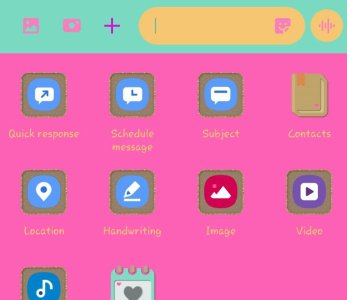
For those still with this issue it's there... hit the + sign.... "schedule message"
 

Attachments

  • 31239.jpg
    31239.jpg
    26.2 KB · Views: 13
Since the Android 10 update I can schedule messages but they never send when they are supposed to.
 
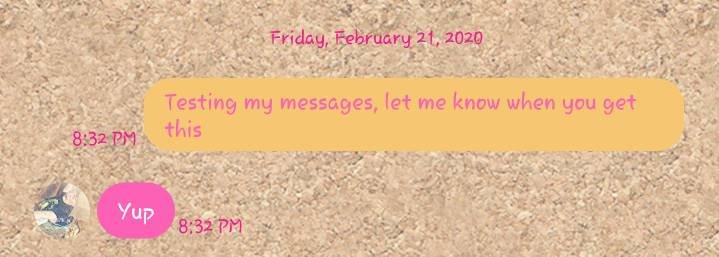
Working for me. I'm on a galaxy s9+, sending to a galaxy note 9. Sprint network. I'll try to send one to an iPhone when my son gets home. I wonder if your network? Hmmm
 
Since the Android 10 update I can schedule messages but they never send when they are supposed to.
Worked from Android to iPhone... maybe the network was down... are you hitting the triangle (send button) when you create the text?
 

Attachments

  • 31383.jpg
    31383.jpg
    30.8 KB · Views: 7

Trending Posts

Forum statistics

Threads
960,946
Messages
6,984,310
Members
3,164,608
Latest member
StephanieKc