Unable to use Google Account to Backup Data

Rwlao86

New member
Jul 8, 2016
3
0
0
Hey Everyone,

I had recently upgraded to a new Samsung Galaxy S7 and noticed that I am not able to back up my data.
When I go into Device Settings -> Backup and Reset. I can see the Google Account, in fact, it even has my e-mail address there.
But everything is greyed out and I can't seem to turn it on?

I attached a screenshot.
Hoping someone else has ran into this issue and has a fix for it.

Thanks in advance
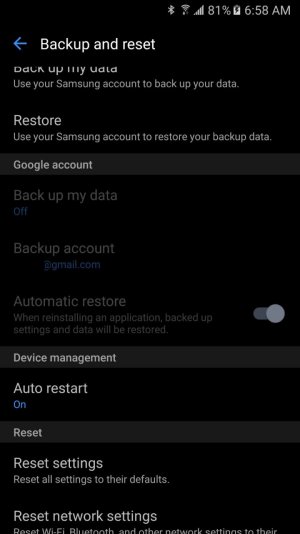
Unable to Backup Google.jpg
 
Looks like Samsung thinks their system is better and is encouraging forcing you to use theirs if you want a backup.
 
Thanks hallux, unfortunately, the Samsung one doesn't back up apps/etc.
Anyway I can enable google instead of Samsung?
 
Google backup should be allowed even if Samsung has one. I initially had both enabled until I realized it's a waste of resources to have both. Anyway, first think I'd check is if you have turned off master sync.

I must inform you though that currently Google Backup has a bug that's preventing Doze, hence consuming more battery. With an S7, while I do have Samsung backup on, I also make backups on Helium+SmartSwitch, since in my experience, Google Backup covers less apps than Helium.
 
Hey Chan Chan,

Thanks for the response, I checked my google account settings and all the sync is on.
Another odd thing I noticed today, is I tried enabled Developer Options, and that as well is all grayed out.

Could it be because this is my work phone, and it has an Airwatch Agent Encryption/etc.?
 
Ah, AirWatch is a possibility. My phone is connected to work using MobileIron but their policies don't block those settings.
 
Ah yes. Could be your work IT team modified it. Use Samsung backup instead and Helium for backup.
