Unroot with out computer???

thedon8253

Well-known member
Sep 3, 2012
91
3
0
Is there any way to unroot my epic 4g touch with out a computer.

Sent from my SPH-D710 using Android Central Forums
 
Did you do a one click to root it in the first place? If so there is something in the folder labeled 000 that u can use.if not I believe supersu in the market can do it

sent from my BAD A$$ Epic touch
 
Yes i did use the 1click method and i.do have the 000 file i looked in it and there was a file in there called unroot is that what i should use

Sent from my SPH-D710 using Android Central Forums
 
Yes. I have never used a one click. However I know people use that to unroot. Sorry I can't tell you how to use it. Is it s zip or tar format?

sent from my BAD A$$ Epic touch
 
The file says install-unroot.sh i have no clue how to.use this file nkr if.its a zip

Sent from my SPH-D710 using Android Central Forums
 
Ok thank u that will unroot my phone then

Sent from my SPH-D710 using Android Central Forums

Sorry to get back to you late. Yes it will unroot your phone. You will still have the superuser app. Just delete it.

sent from my BAD A$$ Epic touch
 
One more question. How do I get my phone back to stock like out of the box.

Sent from my SPH-D710 using Android Central Forums
 
You can look for a one click full restore. I prefer the el29 by sfhub. But most of the one clicks will work. Use any of these ek02 el29 ff18 fh13
Also use the full version. Not no data version.
sent from my BAD A$$ Epic touch
 
Ok i tried to run the unroot script and it said not found. Can i use the 1click unroot with my phone no computer

Sent from my SPH-D710 using Android Central Forums
 
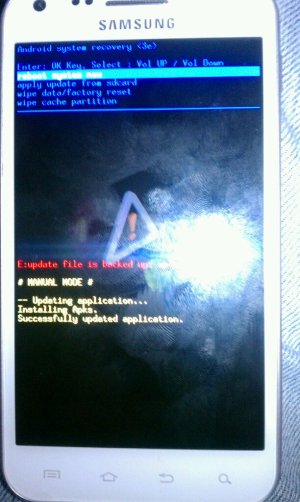
I did the el29 full restore and my phone is bricked. When I go in to the recovery mod it's the android recovery and it won't let me flash any rom or anything. Somebody please help. ASAP.

Sent from my PC36100 using Android Central Forums
 
This is what is says and looks like for recovery

Sent from my PC36100 using Android Central Forums
 

Attachments

  • uploadfromtaptalk1348441353138.jpg
    uploadfromtaptalk1348441353138.jpg
    104.9 KB · Views: 15
Well the only way to get out of this is now PC Odin. Do you have a flash count when you boot into download mode? Download mode is power and volume down.

sent from my BAD A$$ Epic touch
 
Do you have an actual rom? When you click reboot system does it go into a rom?

sent from my BAD A$$ Epic touch
 
No. When I click on reboot it goes to the Samsung screen like it's gonna boot but then stays there.

Sent from my PC36100 using Android Central Forums
 
I don't have access to a computer now but I will in a little bit. Once I do where do I start.

Sent from my PC36100 using Android Central Forums
 
In recovery try going to factory reset. Push the home key I believe. Then try to reboot. Flash count is a Samsung count that basically says whether you tried to install custom firmware. By going into download mode pushing power button and volume down and holding both. It will come to a screen saying push up volume. Do that. Then tell me if there is a binary flash count number.

sent from my BAD A$$ Epic touch
 

Trending Posts

Forum statistics

Threads
962,025
Messages
6,988,762
Members
3,164,763
Latest member
Marg