Verizon MM / Updates

Re: Cog icon in apps settings Marshmallow

Here's the screenShot.

Samsung Galaxy S5 Marshmallow 6.0.1 Verizon

And the cog/settings icon is there at the top right corner, as it should. Not sure if I completely understand what you're problem is.
 
Re: Marshmallow settings

Can you post a screen shot of your app manager?

Here's the screenShot.

Samsung Galaxy S5 Marshmallow 6.0.1 Verizon
 

Attachments

  • Screenshot_2016-06-16-10-46-56.jpg
    Screenshot_2016-06-16-10-46-56.jpg
    57.9 KB · Views: 25
Re: Cog icon in apps settings Marshmallow

And the cog/settings icon is there at the top right corner, as it should. Not sure if I completely understand what you're problem is.

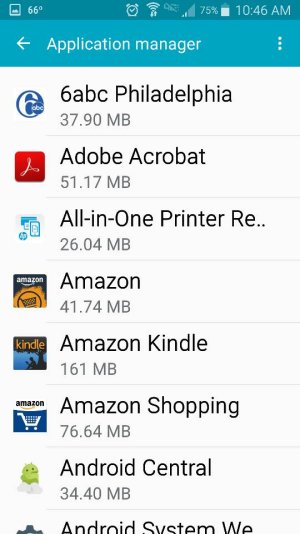
The cog at the top right corner is the settings cog and I see no correlation with the Application screen. Are we on the same page?

Samsung Galaxy S5 Marshmallow 6.0.1 Verizon
 
Re: Cog icon in apps settings Marshmallow

What are you trying to do? Are you trying to add a shortcut for the settings on the home screen, enable the system UI tuner ... ?

I'm on Verizon, too, and I don't think the System UI Tuner is available. I've tried enabling it, as instructed from various sources, and it doesn't seem to be an option. I'd love to be wrong.
 
Re: Cog icon in apps settings Marshmallow

I'm on Verizon, too, and I don't think the System UI Tuner is available. I've tried enabling it, as instructed from various sources, and it doesn't seem to be an option. I'd love to be wrong.

Unfortunately you're right :) As far as I know Samsung didn't include the UI tuner in their update.
 
Re: Cog icon in apps settings Marshmallow

Unfortunately you're right :) As far as I know Samsung didn't include the UI tuner in their update.

Now what? I really appreciate your help. It's very frustrating.

Samsung Galaxy S5 Marshmallow 6.0.1 Verizon
 
Re: Cog icon in apps settings Marshmallow

Now what? I really appreciate your help. It's very frustrating.

Samsung Galaxy S5 Marshmallow 6.0.1 Verizon

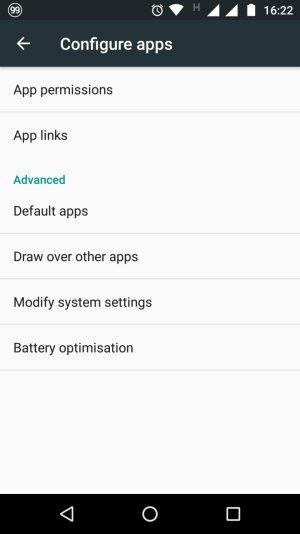
Not sure, I think that cog you mention is not included in your phone. What options do you get in settings - application manager - three dots top right? If you have one called 'advanced' tap on it and check the sub-menu. Still, I'm not sure what you want to do with that cog. These are the options included in Moto and Nexus devices after you tap on the cog in the app manager.
 

Attachments

  • 1466104997312.jpg
    1466104997312.jpg
    69.8 KB · Views: 9
Re: Cog icon in apps settings Marshmallow

Let me explain what I'm trying to do. In Lollipop, in the share menu, I could select any program from the list and have to answer a question "do this all the time, or just once. That option is no longer available, but I understand it's somewhere in marshmallow. I just need to find it. Can anyone directly to the correct area for me to do this?. Thanks.

Samsung Galaxy S5 Marshmallow 6.0.1 Verizon
 
Re: Cog icon in apps settings Marshmallow

Let me explain what I'm trying to do. In Lollipop, in the share menu, I could select any program from the list and have to answer a question "do this all the time, or just once. That option is no longer available, but I understand it's somewhere in marshmallow. I just need to find it. Can anyone directly to the correct area for me to do this?. Thanks.

Samsung Galaxy S5 Marshmallow 6.0.1 Verizon

Now I see and I don't have very good news for you. This 'just once/always' option has been removed in many Samsung devices, mostly carrier locked. Your best option could be using a third party app from the Play Store. This issue has been discussed for different devices in this thread. Take a look.

http://forums.androidcentral.com/showthread.php?t=658699
What do you think of the lack of "Just once" and "Always" on the S7?
 
Re: Cog icon in apps settings Marshmallow

Now I see and I don't have very good news for you. This 'just once/always' option has been removed in many Samsung devices, mostly carrier locked. Your best option could be using a third party app from the Play Store. This issue has been discussed for different devices in this thread. Take a look.

http://forums.androidcentral.com/showthread.php?t=658699
What do you think of the lack of "Just once" and "Always" on the S7?

I think it sucks. Why would they get rid of such a useful tool?

Samsung Galaxy S5 Marshmallow 6.0.1 Verizon
 
Re: Cog icon in apps settings Marshmallow

Check BetterOpenWith app on Play Store.
 
Re: Marshmallow settings

I tried that. It's not the problem.

What happens if you tap on the 3 dots on the right side? Can you sort or select disabled apps there?
 
Re: Marshmallow settings

Just wanted you to know that I'm on Verizon/6.0.1/S5, and I do have the All Apps option on my phone.

That's interesting. We have identical phones, identical operating system versions. Are you using TouchWiz?

Samsung Galaxy S5 Marshmallow 6.0.1 Verizon
 
Re: Marshmallow settings

OK - I am using Nova Launcher, but I switched it back to TouchWiz and TouchWiz Easy and BOTH of those options show the "All Apps" down arrow.

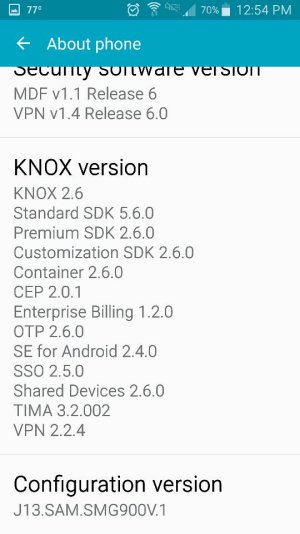
Just out of curiousity, can you post a screenshot of your "About Device" screen? Let's have a look at the firmware and baseband versions...
 
Re: Marshmallow settings

OK - I am using Nova Launcher, but I switched it back to TouchWiz and TouchWiz Easy and BOTH of those options show the "All Apps" down arrow.

Just out of curiousity, can you post a screenshot of your "About Device" screen? Let's have a look at the firmware and baseband versions...
This is all the screens on the About Device. I hope they help.

Samsung Galaxy S5 Marshmallow 6.0.1 Verizon
 

Attachments

  • Screenshot_2016-06-17-12-54-08.jpg
    Screenshot_2016-06-17-12-54-08.jpg
    53.8 KB · Views: 24

Trending Posts

Members online

Forum statistics

Threads
960,689
Messages
6,983,256
Members
3,164,545
Latest member
jnnfrmcmrphy00