Warning Recording Failed!!

Apr 13, 2017
15
0
0
So my Galaxy S9+ was delivered yesterday and I have not been able to make a video on it yet because everytime I try to launch the video camera, I get the same error message over and over again as you can see in the attached picture.

I can restart my device and then it will work for a few but then I fire up the camera and it goes right back to giving me the same error. I already tried hard resetting the phone and I have also reformatted my SD card.

Has anyone else experienced this issue?
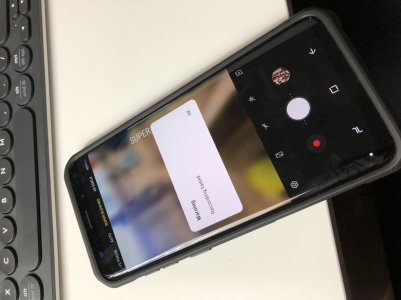
IMG_2010.jpg
 
At least one thought would be to try it without the case. It is possible the case is blocking one of the microphones, due to poor design or a flaw in manufacturing.
 
Check for updates. Camera fixes were included in first software update released March 13th. I've recorded several videos and have not experienced what you describe.
 
Alright, well I called up Samsung and they fixed it by having me 'wipe the cache partition,' whatever that means. I'll leave the instructions here for anyone having the same problem. This doesn't delete any data you have on your phone and it is not a factory reset. But a factory reset would have been the next thing to try if this hadn't worked.

Hi, These are the steps on how to perform wipe cache partition: 1. Please turn off the phone completely. 2. While the phone is off, please press and hold the volume up, bixby button and the power button all the same time. 3. Please wait until you will see on the screen Installing System Update. 4. Once you see it, please release the buttons now. 5. Wait until the Android Recovery Menu appears on the screen. 6. When you see it, you will see a difference options there. 7. Look for wipe cache partition, to scroll down going there please use the volume down. 8. Once it is highlighted, please press the power key to select. 9. After you selected wipe cache partition, you will be prompted to select yes or no, please select yes using the power key again. 10. Automatically, the Reboot System Now will be highlighted, please select it using the power key again. 11. The phone will restart. Note: If this doesn't work, please visit one of the Best Buy stores in your area and look for Samsung experience Shop and have the software of the phone re-flashed.

Best of luck everyone.
 
The steps Samsung gave you should be followed after every OS update. Glad you got it fixed. Enjoy your phone.
 
Update: after just a few hours it is back to the same error message! I can not think of any reason for this to be happening or how to fix it.
 
Another update: Okay, it had occurred to me that after I got the phone I had turned on developer options to do some things and had never disabled it. So I turned off developer options and for whatever reason I am now again able to record videos. I have no explanation for this but I wanted to share it here.
 
Me too. That fixed it.

An app was also using my mic, I think an app caused it and DO was trying to deal with it.
 

Latest posts

Trending Posts

Forum statistics

Threads
960,697
Messages
6,983,277
Members
3,164,545
Latest member
cheddabob66
