Weather app

nic_xoxo

Member
Aug 28, 2015
5
0
0
So I've had my s5 for almost a year... It's my first android and I am loving it more and more. I've always been an avid weather channel user but it keeps crashing and draining my battery. I downloaded accuweather but it does not follow me to keep updated weather. I am looking for a weather app that follows my location, has a decent radar map, and offers an easy to read app. Any suggestions before I start downloading them all??? Thanks!
 
SP1 is right on about 1W.

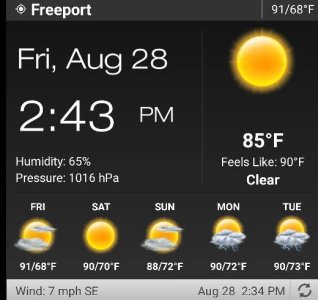
Also might look at Weather and Clock Widget by Devexpert. The widget has numerous adjustable settings. Actually doesn"t have a rader map but you can assign the date or time as a shortcut for any app you want.

I have Rainy Days radar on one of them and Accuweather radar on the other.

Posted via the Android Central App
 

Attachments

  • 2015-08-28 14.45.52.jpg
    2015-08-28 14.45.52.jpg
    31 KB · Views: 22
Last edited:
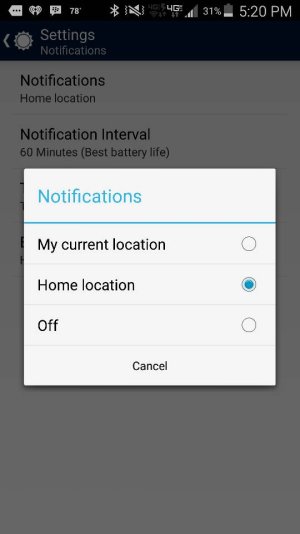
Accuweather can do this. Change your notification setting to "my current location" (see screen shot). Also hit the "location" icon to the right of the city name on main screen - it should "follow" your current location then.

Posted via the Android Central App - Verizon S5
 

Attachments

  • Screenshot_2015-08-28-17-20-26.jpg
    Screenshot_2015-08-28-17-20-26.jpg
    34.6 KB · Views: 13
Accuweather can do this. Change your notification setting to "my current location" (see screen shot). Also hit the "location" icon to the right of the city name on main screen - it should "follow" your current location then.

Posted via the Android Central App - Verizon S5

I shouldve mentioned im OCD and hate the temp in my status bar lol

There isnt a way to have it follow me without that being there? And when i use the location button, it never follows. Right now im traveling and when i use the app or widget, it just shows my home location
 
Accuweather can do this. Change your notification setting to "my current location" (see screen shot). Also hit the "location" icon to the right of the city name on main screen - it should "follow" your current location then.

Posted via the Android Central App - Verizon S5
o


So i did what you suggested and its still only showed home but i rebooted my phone and it shows my location now... test will be tomorrow when i leave this city..thanks!
 

Trending Posts

Forum statistics

Threads
960,680
Messages
6,983,210
Members
3,164,543
Latest member
rajaryson24