Question Weird Netflix app running on my new tab 9 +

Marlasboy

New member
Feb 20, 2019
2
0
1
1709.jpg

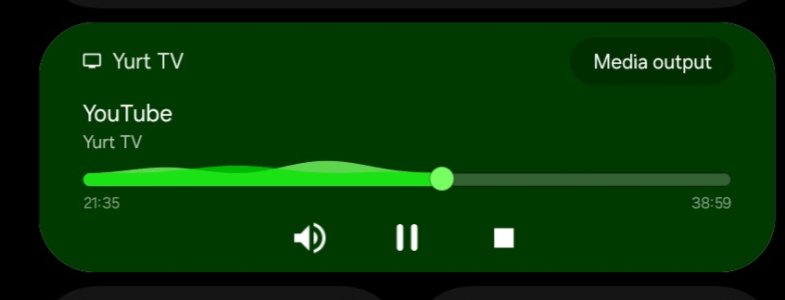
Can anyone please tell me what this is and how to get rid of it. Always pops up in the evening
 
Welcome to Android Central! Do you share your wi-fi network with anyone else? If there are multiple devices connected to your Wi-Fi network, then if they cast to a TV, you will typically also see media controls for that on your device.
 
Welcome to Android Central forums.

Gemini says to take these actions, which include actions the streamer might take, if you interact with them.

To Stop Notifications on Your Tablet (Android)
  1. Open Settings: On your Android tablet, go to the Settings app.
  2. Find Google Settings: Scroll down and tap on Google.
  3. Go to Devices & sharing: Tap on Devices & sharing (or Connected devices).
  4. Access Cast options: Tap on Cast options or Cast media controls.
  5. Disable Controls: Turn off the toggle for Media controls for Cast devices or Let others control your cast media.

To Stop the TV from Showing Notifications (For the TV Owner)

  1. Open Google Home App: On the owner's phone, open the Google Home app.
  2. Select the TV/Chromecast: Touch and hold the tile for the TV or Chromecast device.
  3. Go to Settings: Tap the Settings (gear icon).
  4. Find Recognition & sharing: Tap on Recognition & sharing.
  5. Turn it Off: Select Let others control your cast media and turn it Off (or select Never for Chromecast with Google TV).

Why This Happens

  • Shared Network: Devices on the same Wi-Fi network can see each other's casting status by default.
  • Google Account (Sometimes): If the tablet and Chromecast are linked to the same Google account, notifications are automatic.
Let us know if this works for you.
 
  • Like
Reactions: B. Diddy