What App Shows Ads?

gregory_opera

Active member
May 6, 2012
41
0
6
So lately I've been getting advertisements in the notification area on my Sony Xperia S and it's really rather annoying... I get it pop-up once or twice a day.

But how do I work out what app is doing this?


Sent from my LT26i using Android Central Forums
 
Do you mind posting list of apps you installed apart from the standard google apps??

you can narrow the list by posting apps that runs when you receive the notification. that would be a good start.

after you find the app i recommend removing the app and look for alternative.

if you are in Jelly Bean you can long press the notification and it will give a menu for app info were you can find the app
 
Go into the application settings (Menu > Settings > Applications > Running) and search through the running tab for the culprit. It will likely be one of these apps you downloaded. Delete it.

If it's an app you need there should be a replacement in the Play Store. I think there is an app in the Play Store which disables these types of adds in the notification area if you don't want to delete the app.
 
Sv: What App Shows Ads?

I don't know if you can do this but it's worth a try. When the pop up show up next time try longpressing it. When I do it I can get information about the app.

Skickat fr?n min Galaxy Nexus via Tapatalk 2
 
Re: Sv: What App Shows Ads?

I don't know if you can do this but it's worth a try. When the pop up show up next time try longpressing it. When I do it I can get information about the app.

Skickat fr?n min Galaxy Nexus via Tapatalk 2
Thats only jelly bean feature. wont work with previous release.
 
Do you mind posting list of apps you installed apart from the standard google apps??

you can narrow the list by posting apps that runs when you receive the notification. that would be a good start.

My app-count is in the hundreds, though as I have pointed out below, I think I've narrowed it down via the "Running Apps" tab in settings...


Go into the application settings (Menu > Settings > Applications > Running) and search through the running tab for the culprit. It will likely be one of these apps you downloaded. Delete it.

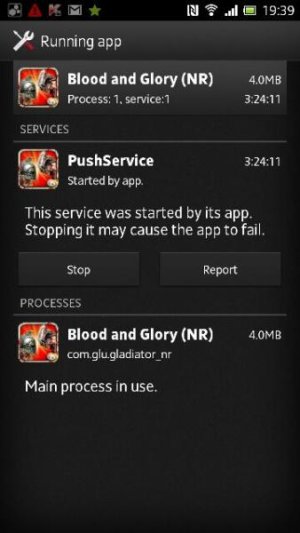
"Blood and Glory" shows that "PushService" is running when I follow your instructions and access the "Running App" details screen (as per the attached screen-shot)... It is the only currently-running app that shows this service as running.

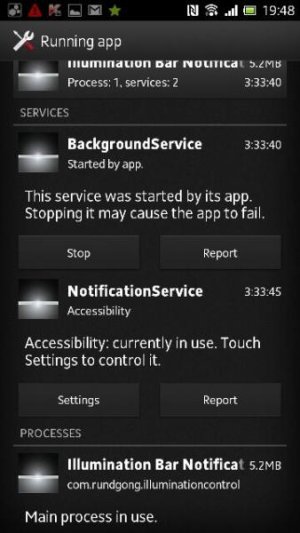
The only similar service that is running at the time the notification is on-screen is "Illumination Bar Notification", which indicates that it is running the "NotificationService"...

Based on this information, it'd likely be "Blood and Glory" to blame, right?


Sent wirelessly from my Sony Xperia S, via the official Android Central app...
 

Attachments

  • uploadfromtaptalk1347616135832.jpg
    uploadfromtaptalk1347616135832.jpg
    26.9 KB · Views: 26
  • uploadfromtaptalk1347616144562.jpg
    uploadfromtaptalk1347616144562.jpg
    32.3 KB · Views: 25
Last edited:
So lately I've been getting advertisements in the notification area on my Sony Xperia S and it's really rather annoying... I get it pop-up once or twice a day.

But how do I work out what app is doing this?


Sent from my LT26i using Android Central Forums

Try AirPush Detector from the market.
 

Trending Posts

Members online

Forum statistics

Threads
959,847
Messages
6,980,374
Members
3,164,318
Latest member
jmarshallcleaning